
County Line, AL · Blount County
Gross Receipts Affidavit
This affidavit reports a business’s gross receipts within the Town of County Line for the stated period, for submission by a business representative when requested.
- licensed online notary
- ~15 min average
- Notarized PDF emailed
What you’ll need
- Government-issued photo ID
- Webcam-enabled device (laptop or phone)
- This form, ready to upload as a PDF
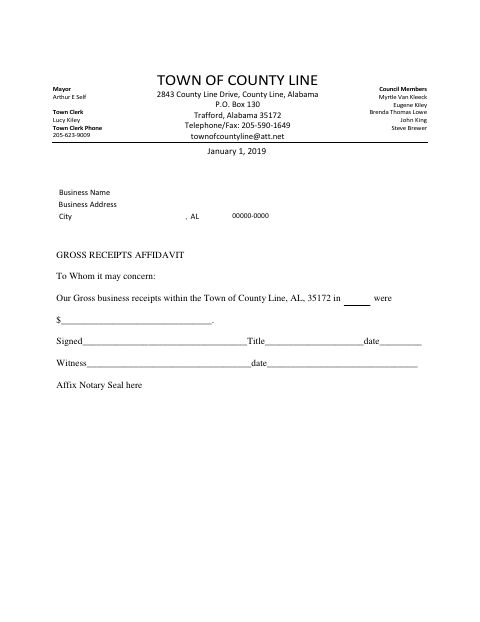
What this form is
The form provides a space to report gross business receipts within the Town of County Line, along with fields for the signer’s signature, title, date, and a witness’s signature and date. It also has an area marked for a notary seal. Use it when the town or another requesting party asks a business to certify its receipts within the town.
Who needs it
A business representative may need this form when asked to report gross business receipts earned within the Town of County Line.
Why it needs a notary
The form has a notary-seal area but no printed jurat or acknowledgment wording; the signer and witness have signature lines, so confirm signing instructions with the requester.
How to get this notarized
- 1
Download the Form
Obtain the Town of County Line Gross Receipts Affidavit.
- 2
Fill In the Details
Enter gross receipts within the town and complete the signer’s name, title, date, and witness fields.
- 3
Book an Online Notary
If the requester requires notarization, arrange an appointment with a commissioned online notary.
- 4
Sign as Instructed
Follow the requester’s instructions for signing and witnessing the form during the online session.
- 5
Submit the Affidavit
Send the completed form to the town or other party that requested it.
Preview the form
The blank PDF straight from County Line. Look it over, then upload your filled copy to start the notary session.

You’ll need ID and a webcam.
A licensed online notary will join you on video, verify your government-issued ID, witness your signature, and apply their seal. You’ll receive the notarized PDF by email when the session ends.
Frequently asked questions
- What does the Gross Receipts Affidavit report?
- It provides a space to state gross business receipts within the Town of County Line, plus signature, title, date, witness, and notary-seal fields.
- Do I need to sign this form in front of a notary?
- The form includes an area for a notary seal but no printed jurat or acknowledgment wording. Confirm whether notarization is required and how to sign with the requester.
- How do I complete and submit the affidavit?
- Enter the receipts amount, complete the signer and witness fields, follow any notarization instructions, and submit it to the requesting party. Confirm with the city or town if unsure.
- Can a commissioned online notary notarize this form?
- Alabama’s remote-notary law requires the notary to be physically in Alabama. Under Ala. Code §35-4-26, an out-of-state acknowledgment may have the same effect if it follows the law where taken and bears the officer’s official seal.