
Lincoln, AL · Talladega County
Gasoline Tax Report
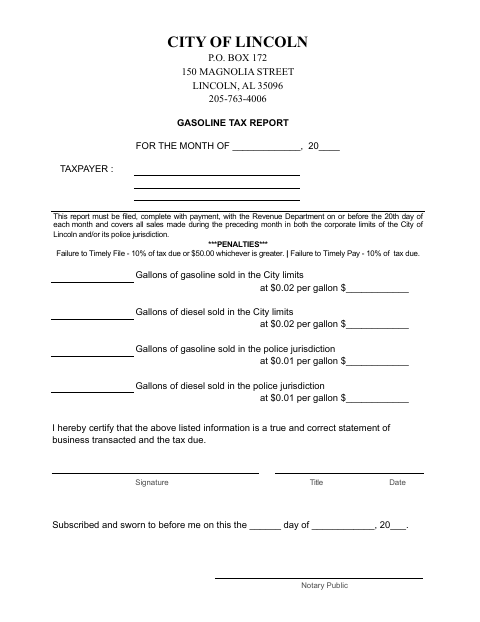
The Gasoline Tax Report records monthly gasoline and diesel sales in Lincoln’s city limits and police jurisdiction for taxpayers filing with the city’s Revenue Department.
- licensed online notary
- ~15 min average
- Notarized PDF emailed
What you’ll need
- Government-issued photo ID
- Webcam-enabled device (laptop or phone)
- This form, ready to upload as a PDF
What this form is
Use this report to list gasoline and diesel gallons sold during the preceding month in Lincoln’s corporate limits and/or police jurisdiction, calculate the tax due, and certify that the information is true and correct. The completed report and payment must be filed with the Revenue Department by the 20th of each month. The form also states penalties for late filing and late payment.
Who needs it
A taxpayer reporting gasoline or diesel sales in Lincoln’s corporate limits or police jurisdiction must complete this report and file it with payment.
Why it needs a notary
The report includes a subscribed-and-sworn jurat; the taxpayer’s signer must certify the report and swear to it before the notary.
How to get this notarized
- 1
Download The Report
Get the Gasoline Tax Report from the City of Lincoln.
- 2
Fill In Monthly Sales
Enter the reporting month, taxpayer information, gallons sold, and tax due.
- 3
Book An Online Notary
Arrange a notary appointment and confirm the city accepts remote notarization.
- 4
Sign On Video
Sign and swear to the report before the notary during your appointment.
- 5
Submit To The City
File the completed report with payment with the Revenue Department by the 20th.
Preview the form
The blank PDF straight from Lincoln. Look it over, then upload your filled copy to start the notary session.

You’ll need ID and a webcam.
A licensed online notary will join you on video, verify your government-issued ID, witness your signature, and apply their seal. You’ll receive the notarized PDF by email when the session ends.
Frequently asked questions
- How do I file the Gasoline Tax Report?
- Complete the monthly sales and tax information, sign and swear to the report before a notary, then file it with payment with the Revenue Department by the 20th.
- Do I need to sign this report before a notary?
- Yes. The form includes a subscribed-and-sworn jurat, so the taxpayer’s signer must sign and swear to the report before a notary.
- Can I use a commissioned online notary?
- The form requires an oath before a notary but does not specify online notarization. Confirm with the city or town if unsure whether it accepts a remotely notarized report.
- What sales should I include?
- Report gasoline and diesel sales from the preceding month in Lincoln’s corporate limits and/or police jurisdiction, as requested by the form.
Other forms in Lincoln
Gasoline Tax Report in other Talladega County cities
Each city publishes its own version of this form. Pick the city where you’re filing.