
Unalaska, AK · Aleutians West Census Area
Authorization to Make Application by Agent
This form lets an owner of property in Unalaska authorize a named agent to apply to the City of Unalaska for a listed planning action, such as a conditional use or variance.
- licensed online notary
- ~15 min average
- Notarized PDF emailed
What you’ll need
- Government-issued photo ID
- Webcam-enabled device (laptop or phone)
- This form, ready to upload as a PDF
What this form is
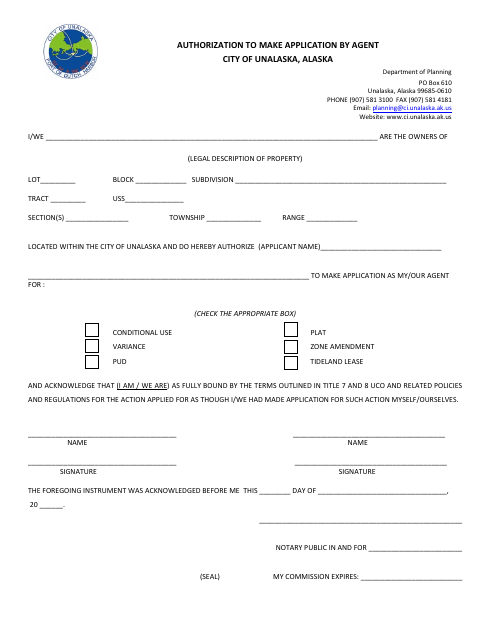
Property owners use this form to authorize a named applicant to act as their agent for a selected Unalaska planning application. The form identifies the property by its legal description and lists actions including a conditional use, plat, variance, zone amendment, PUD, or tideland lease. Owners also acknowledge that they are bound by the terms, policies, and regulations related to the action as though they had applied themselves.
Who needs it
Property owners who want another person to submit an application for one of the planning actions listed on the form may need to complete this authorization.
Why it needs a notary
The form has an acknowledgment block; each owner signing the authorization should acknowledge the signature before the notary.
How to get this notarized
- 1
Download the Form
Download the Authorization to Make Application by Agent form from the City of Unalaska.
- 2
Fill In the Form
Enter the property’s legal description, the agent’s name, and the planning action being applied for.
- 3
Book an Online Notary
Arrange an online notary appointment for the owner or owners who will sign.
- 4
Sign on Video
Sign the authorization during the online notary session and complete the acknowledgment.
- 5
Submit to the City
Submit the completed authorization to the City of Unalaska for the agent’s planning application.
Preview the form
The blank PDF straight from Unalaska. Look it over, then upload your filled copy to start the notary session.

You’ll need ID and a webcam.
A licensed online notary will join you on video, verify your government-issued ID, witness your signature, and apply their seal. You’ll receive the notarized PDF by email when the session ends.
Frequently asked questions
- How do I authorize an agent to apply for a planning action?
- Complete the property description, name the agent, check the applicable planning action, and have the owner or owners sign before a notary.
- Do I need to sign this form in front of a notary?
- The form includes an acknowledgment block for a notary. Owners signing the authorization should acknowledge their signatures before the notary.
- Can I use an online notary for this Unalaska form?
- Alaska permits remote online notarization by its own notaries, and an out-of-state notary's act is generally expected to be recognized. Use a commissioned online notary and confirm acceptance with the City of Unalaska if unsure.
- What if I am unsure whether the city will accept my completed form?
- Contact the City of Unalaska Department of Planning about its application requirements; confirm with the borough or municipality if unsure.