
Ketchikan, AK · Ketchikan Gateway Borough
Public Vehicle Certificate Application
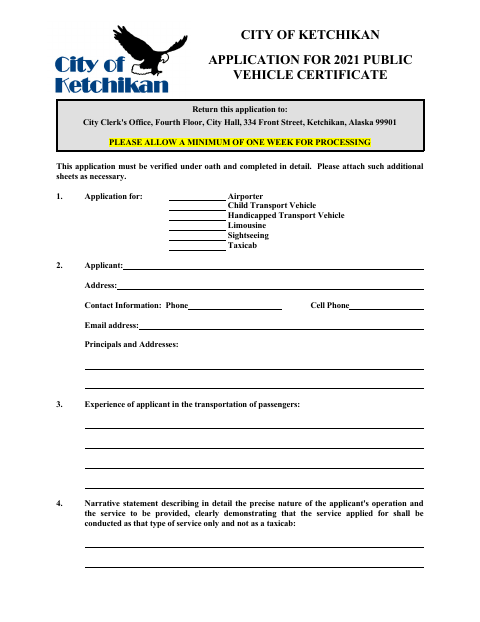
This sworn application requests a City of Ketchikan certificate to operate a public vehicle, such as a taxicab, limousine, airporter, sightseeing vehicle, or handicapped transport vehicle.
- licensed online notary
- ~15 min average
- Notarized PDF emailed
What you’ll need
- Government-issued photo ID
- Webcam-enabled device (laptop or phone)
- This form, ready to upload as a PDF
What this form is
Applicants use this form to request a public vehicle certificate and identify the service, applicant, vehicles, owners, and proposed depots or terminals. The application also requests supporting documents, including insurance and mechanic’s statements, and requires an oath verifying the application and attachments. Return it to the City Clerk’s Office at City Hall; the form asks applicants to allow at least one week for processing.
Who needs it
A person or business applying to operate one or more public vehicles in Ketchikan, including taxicabs and the other listed passenger transport services, needs this application.
Why it needs a notary
The applicant signs the sworn statement before the notary; the form includes a jurat stating it was subscribed and sworn to before a Notary Public for the State of Alaska.
How to get this notarized
- 1
Download the Application
Get the Public Vehicle Certificate Application from the City of Ketchikan.
- 2
Complete the Form
Fill in the applicant, service, vehicle, ownership, and other requested information; attach supporting documents.
- 3
Book an Online Notary
Schedule a commissioned online notary to notarize the application’s sworn statement.
- 4
Sign on Video
Sign the sworn statement during the online notary session and complete the identity verification steps.
- 5
Submit to the City
Send the signed application, attachments, and fee to the City Clerk’s Office, allowing at least one week for processing.
Preview the form
The blank PDF straight from Ketchikan. Look it over, then upload your filled copy to start the notary session.

You’ll need ID and a webcam.
A licensed online notary will join you on video, verify your government-issued ID, witness your signature, and apply their seal. You’ll receive the notarized PDF by email when the session ends.
Frequently asked questions
- How do I complete the public vehicle application?
- Complete the application, attach the listed insurance and mechanic documents, and sign the sworn statement before a commissioned online notary. Submit the application and fee to the City Clerk’s Office.
- Do I need to sign the application in front of a notary?
- Yes. The form says the application must be verified under oath and includes a jurat for the applicant’s signature before a notary.
- Can I use an online notary for this application?
- Alaska authorizes remote online notarization for its own notaries, and an out-of-state notary’s act is generally expected to be recognized. Confirm with the borough or municipality if unsure.
- What documents does the application checklist request?
- The checklist names the application form, insurance certificate, mechanic’s certificate or certificates, filing fee, and license plate numbers. The form also requests vehicle and service details.