
Benson, AZ · Cochise County
Affidavit of Qualification
This affidavit states a candidate’s qualifications and City of Benson residency for appointment to the City Council, and includes a statement acknowledging campaign finance and reporting laws.
- licensed online notary
- ~15 min average
- Notarized PDF emailed
What you’ll need
- Government-issued photo ID
- Webcam-enabled device (laptop or phone)
- This form, ready to upload as a PDF
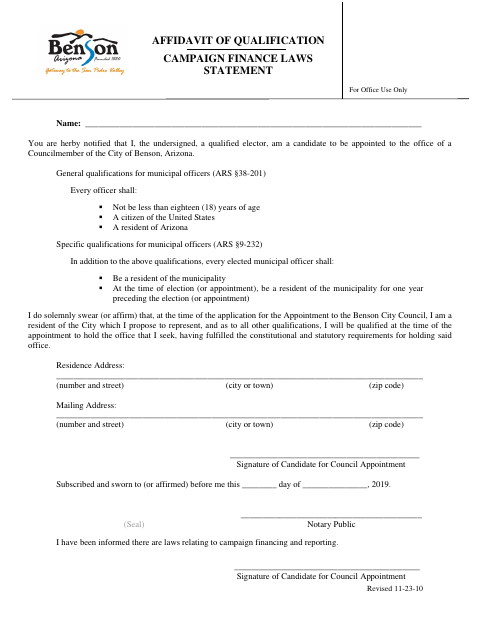
What this form is
The form is for a qualified elector seeking appointment to the Benson City Council. The candidate swears or affirms their residency and qualifications for office, provides residence and mailing addresses, and acknowledges being informed about campaign finance and reporting laws. The form includes a notary section and a separate candidate signature for the campaign finance statement.
Who needs it
A qualified elector seeking appointment to the Benson City Council uses this form to state their residency and qualifications and acknowledge campaign finance information.
Why it needs a notary
The form carries a subscribed-and-sworn jurat; the candidate signs the qualification statement before the notary and also signs the campaign finance statement.
How to get this notarized
- 1
Download the Affidavit
Get the Affidavit of Qualification from the City of Benson.
- 2
Fill In Your Information
Enter your name, residence address, and mailing address. Review the qualification and campaign finance statements.
- 3
Book an Online Notary
Schedule a Rush Notary session with a commissioned online notary.
- 4
Sign on Video
Sign the qualification statement before the notary during the live audio-video session.
- 5
Submit to the City
Submit the completed affidavit to the City of Benson.
Preview the form
The blank PDF straight from Benson. Look it over, then upload your filled copy to start the notary session.

You’ll need ID and a webcam.
A licensed online notary will join you on video, verify your government-issued ID, witness your signature, and apply their seal. You’ll receive the notarized PDF by email when the session ends.
Frequently asked questions
- How do I get the Affidavit of Qualification notarized?
- Complete the form and book a Rush Notary session. Sign the qualification statement before a commissioned online notary over live audio-video, then submit the form to the City of Benson.
- Do I need to sign this affidavit before a notary?
- Yes. The form includes a subscribed-and-sworn jurat for the candidate’s qualification statement. The candidate also signs the separate campaign finance statement.
- Can I complete this form with a remote online notary?
- Arizona has authorized remote online notarization for its own notaries since July 2020 and recognizes notarial acts performed by notaries of other states. Rush Notary sessions are held over live audio-video; confirm with the city if unsure.
- What information does the affidavit ask for?
- The form asks for the candidate’s name, residence address, and mailing address. It also includes sworn statements about residency and qualifications for appointment and an acknowledgment about campaign finance and reporting laws.