
Tombstone, AZ · Cochise County
Utility Service Disconnection Request
This request lets residential or commercial utility account holders ask Tombstone to disconnect service at an address associated with their account.
What this form is
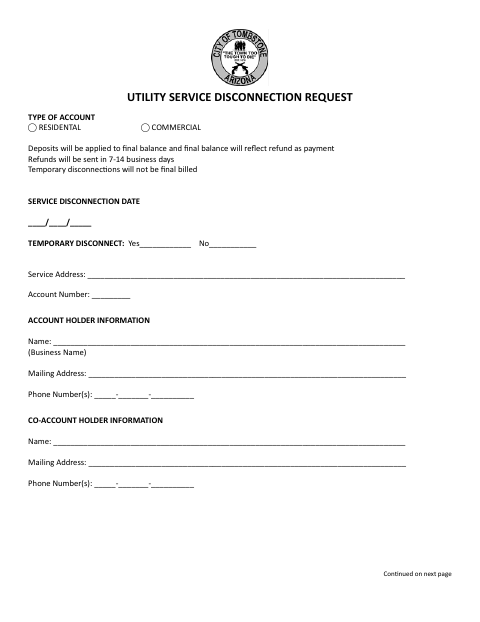
Use this form to request a temporary or final disconnection of residential or commercial utility service. It asks for the disconnection date, service address, account number, account holder and co-account holder details, and signatures. The form states that temporary disconnections will not be final billed and explains how deposits, refunds, and final balances are handled.
Who needs it
Residential or commercial utility account holders who want service disconnected should complete and sign this request.
How to submit it
Submit it to the city department named on the form; check the city website for current contact details.
About notarization
This request is signed and dated without a notary; the form lists no notarized or sworn attachment or related step.
How to submit this form
- 1
Download The Request
Download the Utility Service Disconnection Request PDF.
- 2
Complete The Form
Select the account type and enter the disconnection date, temporary disconnect choice, service address, account number, and account holder details.
- 3
Gather Attachments
The form lists no attachments; check that the requested account and contact details are complete.
- 4
Sign And Submit
The utility applicant and co-applicant can sign and date the request. Submit it to the city department named on the form.
Frequently asked questions
- Do I need a notary for the Utility Service Disconnection Request?
- No. The form has signature and date lines for the utility applicant and co-applicant, but no notary block or notarized attachment.
- How do I submit the Utility Service Disconnection Request?
- The form does not specify a submission method or contact details. Submit it to the city department named on the form; check the city website for current contact details.
- What information does the request ask for?
- It asks for the account type, disconnection date, temporary disconnect selection, service address, account number, account holder and co-account holder details, and signatures.