
Clifton, AZ · Greenlee County
Public Records Inspection and Copy Request
This two-page form lets a person ask the Town of Clifton to inspect public records or receive copies, printouts, or photographs, with a verified commercial-purpose statement when applicable.
- licensed online notary
- ~15 min average
- Notarized PDF emailed
What you’ll need
- Government-issued photo ID
- Webcam-enabled device (laptop or phone)
- This form, ready to upload as a PDF
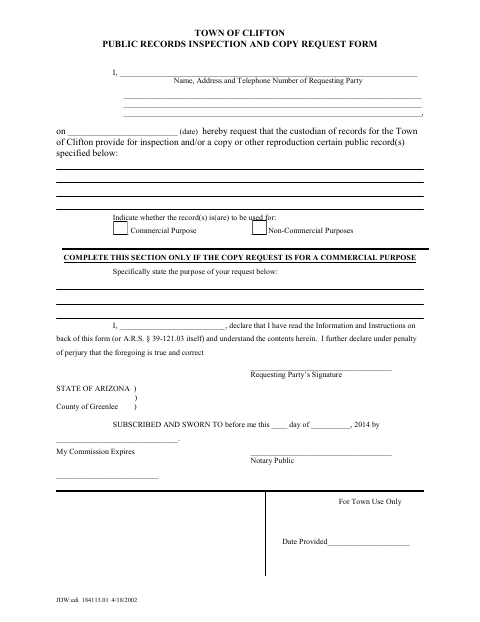
What this form is
Use this form to identify the records you want to inspect or have reproduced and to state whether the request is for a commercial or non-commercial purpose. The form asks commercial-purpose requesters to describe their purpose and includes a declaration under penalty of perjury. Clifton's instructions say to submit a completed form to the Town Clerk or appropriate records custodian; written requests for copies must be mailed, and fees may apply before materials are delivered.
Who needs it
Anyone asking the Town of Clifton to inspect public records or receive copies, printouts, or photographs should complete this form and specify the records requested.
Why it needs a notary
The form contains a jurat stating “subscribed and sworn to”; the requesting party signs and swears to the declaration before the notary.
How to get this notarized
- 1
Download the Form
Get the Town of Clifton Public Records Inspection and Copy Request Form.
- 2
Fill Out the Request
Identify the records, indicate commercial or non-commercial use, and state the commercial purpose if applicable.
- 3
Book an Online Notary
Schedule a Rush Notary session with a commissioned online notary.
- 4
Sign on Video
Sign and swear to the declaration during the live audio-video session.
- 5
Submit to the Town
Present the form in person or mail it as directed in Clifton's instructions; written requests for copies must be mailed.
Preview the form
The blank PDF straight from Clifton. Look it over, then upload your filled copy to start the notary session.

You’ll need ID and a webcam.
A licensed online notary will join you on video, verify your government-issued ID, witness your signature, and apply their seal. You’ll receive the notarized PDF by email when the session ends.
Frequently asked questions
- How do I submit the completed public records request?
- Complete the form and identify the records you want. Clifton's instructions say in-person requests must be presented to the Town Clerk or appropriate records custodian. Written requests for copies must be mailed with the completed form; fees may be due before delivery.
- Do I need to sign this form in front of a notary?
- The form includes a “subscribed and sworn to” jurat and a declaration under penalty of perjury. Sign and swear to the declaration before the notary, and check with the Town Clerk if you have questions about completing the form.
- Can I use an online notary for this form?
- Arizona has authorized remote online notarization for its own notaries since July 2020 and recognizes notarial acts by notaries of other states. Rush Notary sessions are with a commissioned online notary over live audio-video; confirm with the city/town if unsure.
- What extra information is required for a commercial request?
- If the copies are for a commercial purpose, the form asks you to state that purpose. Its instructions require a verified statement describing the intended commercial use, and explain that charges may include reproduction costs, staff and equipment time, and commercial-market value.