
Patagonia, AZ · Santa Cruz County
Arizona Joint Tax Application
Businesses use this application to register for Arizona transaction privilege, use, withholding, or unemployment tax accounts and applicable city licenses.
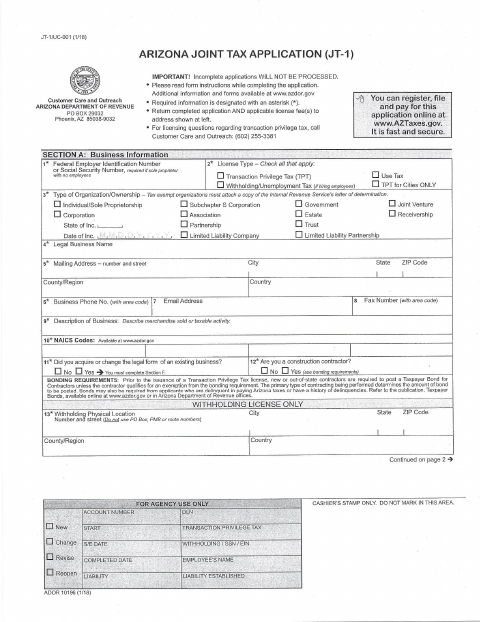
What this form is
The Arizona Joint Tax Application lets a business apply for transaction privilege tax, use tax, and, if hiring employees, withholding or unemployment tax. It asks about the business, its owners, locations, tax activity, and employees; applicants complete additional sections when applicable. The form includes a fee worksheet for state, county, and city license fees, including Patagonia.
Who needs it
Businesses applying for the tax accounts listed on the form, including those seeking a transaction privilege tax license for Patagonia, use this application.
How to submit it
Return the completed application and applicable license fees to the Arizona Department of Revenue at the Phoenix PO Box shown on the form. The form also says applicants can apply online at AZTaxes.gov.
About notarization
This application is signed and dated without a notary; the form does not identify any attachment or related step that must be notarized or sworn.
How to submit this form
- 1
Download the Application
Download the Arizona Joint Tax Application PDF.
- 2
Complete the Applicable Sections
Provide the requested business, owner, location, and tax information; complete additional sections when they apply.
- 3
Gather Required Items
Include applicable license fees and any attachments required by your answers, such as an IRS determination letter for a tax-exempt organization.
- 4
Submit the Application
Return the application and applicable fees to the Arizona Department of Revenue at the address shown, or apply online at AZTaxes.gov.
Frequently asked questions
- What is the Arizona Joint Tax Application used for?
- Businesses use it to apply for transaction privilege tax, use tax, and, when hiring employees, withholding or unemployment tax accounts. It also includes a city license fee worksheet.
- Do I need a notary for the Arizona Joint Tax Application?
- No. The application is signed and dated without a notary, and it does not identify any attachment or related step that must be notarized or sworn.
- How do I submit the Arizona Joint Tax Application?
- Return the completed application and applicable license fees to the Arizona Department of Revenue at the Phoenix PO Box shown on the form. The form also offers online application at AZTaxes.gov.
Need something notarized?
This Arizona Joint Tax Application doesn’t need a notary — but if you have another Patagonia form that does, a commissioned online notary can help.