
Green Forest, AR · Carroll County
Nuisance Abatement Cost Waiver Application
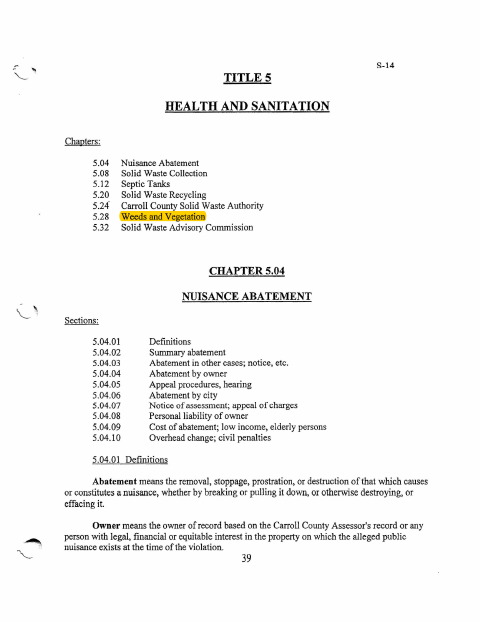
This code chapter explains how an owner may apply to Green Forest’s Police Department/Code Enforcement Officer for a waiver of nuisance-abatement costs and requires information supplied on the application to be notarized.
- licensed online notary
- ~15 min average
- Notarized PDF emailed
What you’ll need
- Government-issued photo ID
- Webcam-enabled device (laptop or phone)
- This form, ready to upload as a PDF
What this form is
Green Forest’s code allows eligible low-income or older property owners who live on the property to seek a waiver of nuisance-abatement costs. The applicant must provide proof of applicable age or income requirements and file the application within ten days after receiving a notice to remove a nuisance or work order notice, unless the enforcement officer extends the deadline. This PDF contains the code requirements, not a standalone application form.
Who needs it
A property owner seeking a nuisance-abatement cost waiver who meets the code’s eligibility requirements should apply to the Police Department/Code Enforcement Officer.
Why it needs a notary
The code requires all information supplied on the waiver application to be notarized; the applicant signs the application before a notary using a jurat.
How to get this notarized
- 1
Download the Code PDF
Download the Health and Sanitation code PDF and review the nuisance-abatement cost-waiver requirements.
- 2
Get the Application
Ask the Police Department/Code Enforcement Officer for an application; the code PDF does not include a standalone application form.
- 3
Complete the Application
Provide the required information and any proof of age or income, and check the filing deadline with the city.
- 4
Book an Online Notary
Arrange a remote notarization with a commissioned online notary before signing.
- 5
Sign on Video
Sign the application during the online notary session and complete the jurat process.
- 6
Submit to the City
File the notarized application with the Police Department/Code Enforcement Officer.
Preview the form
The blank PDF straight from Green Forest. Look it over, then upload your filled copy to start the notary session.

You’ll need ID and a webcam.
A licensed online notary will join you on video, verify your government-issued ID, witness your signature, and apply their seal. You’ll receive the notarized PDF by email when the session ends.
Frequently asked questions
- What does this PDF explain?
- It contains Green Forest code provisions on nuisance abatement, including eligibility and filing requirements for an application to waive abatement costs. It is not a standalone application form.
- Who may qualify for a nuisance-abatement cost waiver?
- The code describes eligibility for low-income applicants and people over 65 who meet its stated conditions. Applicants must also own or be purchasing the property and live there.
- Do I need to have the application notarized?
- Yes. The code says all information supplied on a waiver application must be notarized. The applicant should sign before a notary.
- How do I apply for an abatement cost waiver?
- File the application with the Police Department/Code Enforcement Officer within ten days after receiving a nuisance-removal notice or work order notice, unless the officer extends the deadline. Confirm with the city if unsure.
- Can I sign this application with an online notary?
- Arkansas authorizes remote online notarization for its own notaries under Ark. Code §21-14-309. Arkansas's Uniform Acknowledgment Act, Ark. Code §16-47-203, recognizes acknowledgments taken by a notary public or other authorized officer of another state. Confirm with the city if unsure.