
Oakley, CA · Contra Costa County
Registration Form
Oakley residents use this form to create a CivicRec account and register participants for city recreation programs, field trips, and services.
What this form is
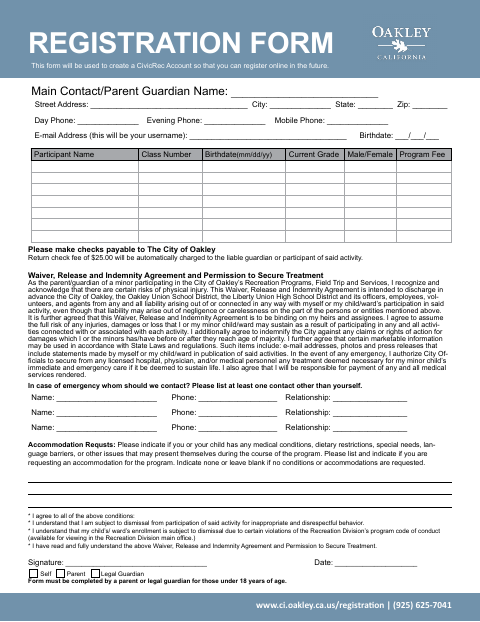
This form creates a CivicRec account for future online registration and collects contact and participant details for Oakley recreation programs, field trips, and services. The parent or legal guardian of a participant under 18 must complete it. The form also asks for emergency contacts, accommodation requests, a program fee, and agreement to the waiver and treatment permission.
Who needs it
A participant or the parent or legal guardian of a participant under 18 should complete this form to register for an Oakley recreation program, field trip, or service.
How to submit it
The form says checks should be payable to the City of Oakley and lists the Oakley registration website and a phone number. It does not state a submission method; check the city website for current contact details.
About notarization
This document is signed and dated without a notary; it includes a waiver and permission to secure emergency treatment, but no notarized or sworn attachment.
How to submit this form
- 1
Download The Form
Download the Oakley Registration Form to create a CivicRec account and register for city recreation programs, field trips, or services.
- 2
Complete The Form
Fill in contact and participant details, emergency contacts, and any accommodation requests; review the waiver and treatment permission.
- 3
Prepare Payment
The form lists a program fee and says checks should be payable to the City of Oakley.
- 4
Submit To The City
The form does not state a submission method. Check the city website for current contact details.
Frequently asked questions
- Do I need a notary for the Oakley Registration Form?
- No. The form is signed and dated without a notary. It includes a waiver and permission to secure emergency treatment, but no notarized or sworn attachment.
- How do I submit the Oakley Registration Form?
- The form does not specify how to submit it. It says checks should be payable to the City of Oakley and lists the registration website and a phone number; check the city website for current contact details.
- Who completes the Oakley Registration Form?
- A participant or the parent or legal guardian of a participant under 18 completes the form. It asks for contact and participant information, emergency contacts, and any accommodation requests.
- What information does the Oakley Registration Form request?
- The form requests contact details, participant names and class numbers, birthdates, grades, program fees, emergency contacts, and accommodation information. The signer also agrees to the waiver and treatment permission.
Need something notarized?
This Registration Form doesn’t need a notary — but if you have another Oakley form that does, a commissioned online notary can help.