
Richmond, CA · Contra Costa County
Electronic Marquee Request Form
Organizations and representatives use this form to request a message on the Richmond Memorial Auditorium electronic marquee.
What this form is
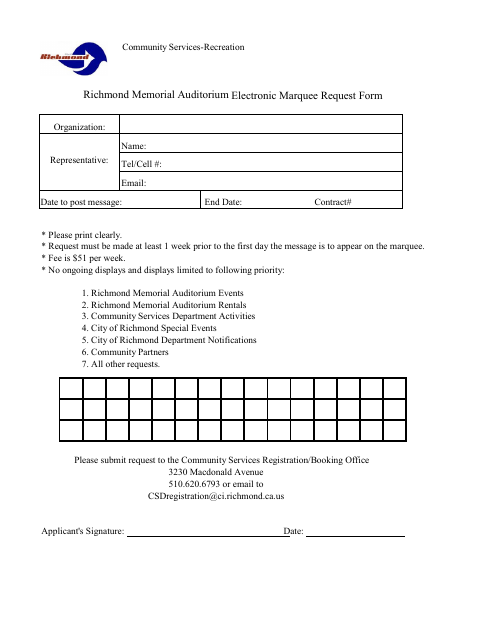
This form lets an organization or representative request a message on the Richmond Memorial Auditorium electronic marquee. It asks for the organization and representative’s contact details, requested display dates, contract number, and applicant’s signature. Requests must be made at least one week before the message is to appear; the listed fee is $51 per week, and displays follow the form’s priority order.
Who needs it
An organization or representative requesting an electronic marquee message at the Richmond Memorial Auditorium should complete this form.
How to submit it
Submit the request to the Community Services Registration/Booking Office at 3230 Macdonald Avenue, by phone at 510.620.6793, or by email as listed on the form. The form lists a fee of $51 per week.
About notarization
This form is signed without a notary; it identifies no notarized attachment or sworn step, so the applicant just signs and dates it.
How to submit this form
- 1
Download the Form
Download the Electronic Marquee Request Form.
- 2
Complete the Request
Print clearly and enter the organization, representative, contact information, display dates, and contract number.
- 3
Sign and Date
Add the applicant’s signature and date. The form does not list an attachment to gather.
- 4
Submit to the City
Send the request to the Community Services Registration/Booking Office at the address, phone number, or email listed on the form.
Frequently asked questions
- Who can request an electronic marquee message?
- The form is for an organization and its representative to request a message on the Richmond Memorial Auditorium electronic marquee.
- When should I submit the marquee request?
- The form says the request must be made at least one week before the first day the message is to appear.
- How do I submit the electronic marquee request?
- Submit it to the Community Services Registration/Booking Office at 3230 Macdonald Avenue, call 510.620.6793, or email the address printed on the form.
- Do I need a notary for the Electronic Marquee Request Form?
- No. The form has an applicant signature and date line but no notary block or notarized attachment; the applicant just signs and dates it.
Need something notarized?
This Electronic Marquee Request Form doesn’t need a notary — but if you have another Richmond form that does, a commissioned online notary can help.