
Eureka, CA · Humboldt County
Direct Payment Plan
Eureka customers use this application to authorize automatic payment of water, sewer, or another bill from a checking or savings account.
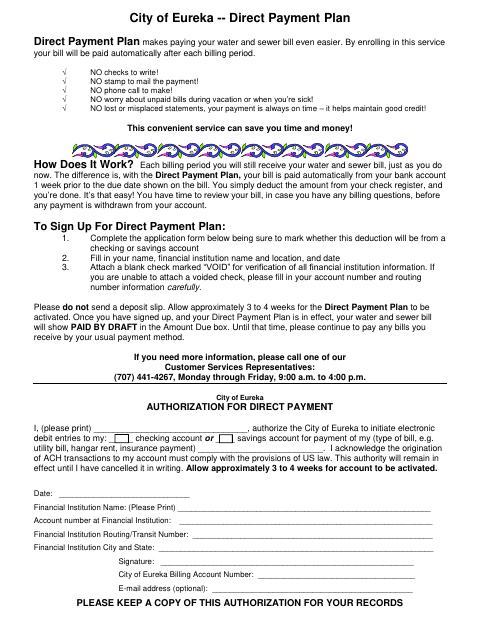
What this form is
This application authorizes the City of Eureka to debit a checking or savings account for a bill, such as a water or sewer bill. Complete it to enroll in the Direct Payment Plan, which the document says pays the bill automatically from the bank account one week before its due date. It asks for account and financial institution details, a signature, and a billing account number.
Who needs it
Eureka customers who want the city to automatically debit a bank account for a bill should complete this application.
How to submit it
Submit it to the city department named on the form; check the city website for current contact details.
About notarization
This document is signed and dated without a notary; attach a blank check marked “VOID” for verification, or enter the account and routing numbers.
How to submit this form
- 1
Download The Application
Download the Direct Payment Plan application PDF.
- 2
Complete The Application
Choose checking or savings, then provide your name, financial institution information, billing account number, and signature.
- 3
Gather The Required Attachment
Attach a blank check marked “VOID,” or carefully fill in your account and routing numbers. Do not send a deposit slip.
- 4
Submit To The City
Submit it to the city department named on the form; check the city website for current contact details.
Frequently asked questions
- What does the Direct Payment Plan application authorize?
- It authorizes the City of Eureka to initiate electronic debit entries from a checking or savings account to pay the bill you specify.
- What information and attachment does the application require?
- Provide your name, financial institution details, account and routing numbers, billing account number, and signature. Attach a blank check marked “VOID,” or carefully enter the account and routing numbers.
- Do I need a notary for the Direct Payment Plan application?
- No. Sign and date the application; attach a blank check marked “VOID” for verification, or enter your account and routing numbers.
- How do I submit the Direct Payment Plan application?
- The document does not give a submission method. Submit it to the city department named on the form; check the city website for current contact details.