
Brawley, CA · Imperial County
Planning Application
This application asks property owners or their authorized representatives to request Brawley planning actions, describe the project, and provide required supporting documents for city review.
- California-licensed notary
- ~15 min average
- Notarized PDF emailed
What you’ll need
- Government-issued photo ID
- Webcam-enabled device (laptop or phone)
- This form, ready to upload as a PDF
What this form is
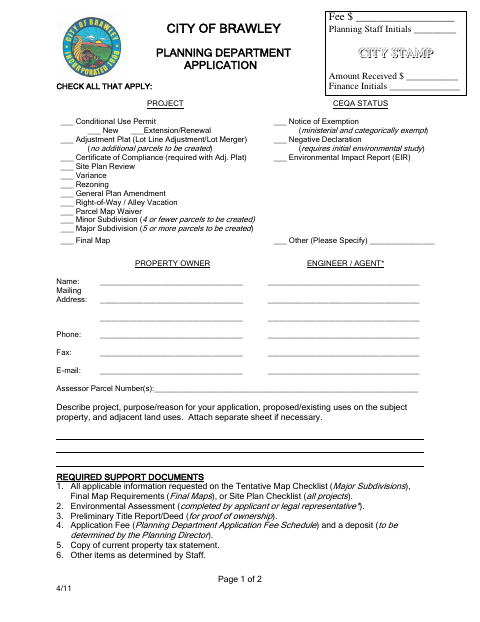
Use this two-page form to request one or more listed planning actions, such as a conditional use permit, site plan review, variance, or subdivision. The applicant provides property and project details and submits supporting documents, fees, and any required deposit. The property owner must have their signature notarized when designating an agent to act and make decisions on their behalf for the project.
Who needs it
Property owners or authorized representatives seeking listed planning actions from Brawley must complete the application and provide the requested project information and supporting documents.
Why it needs a notary
The form has no printed jurat or acknowledgment block; when designating an agent, the property owner must have the property owner's signature notarized.
How to get this notarized
- 1
Download The Application
Get the City of Brawley Planning Department application form.
- 2
Complete The Form
Select the requested planning actions and provide the property, owner, agent, and project details.
- 3
Book An Online Notary
If designating an agent, arrange notarization of the property owner's signature with a commissioned online notary.
- 4
Sign On Video
Follow the notary's instructions for completing the notarization.
- 5
Submit To The City
Include the application, required supporting documents, fees, and deposit when submitting to Brawley's Planning Department.
Preview the form
The blank PDF straight from Brawley. Look it over, then upload your filled copy to start the notary session.

You’ll need ID and a webcam.
A licensed California online notary will join you on video, verify your government-issued ID, witness your signature, and apply their seal. You’ll receive the notarized PDF by email when the session ends.
Frequently asked questions
- When does this planning application require notarization?
- The form says the property owner's signature must be notarized if the owner designates an agent to act and make decisions for the project.
- How do I get the property owner's signature notarized online?
- California notaries cannot perform remote online notarization until the Secretary of State certifies the technology (or 2030). California recognizes out-of-state notarizations under Civil Code §1189(b); ask a commissioned online notary about options and confirm with the city if unsure.
- Do I need to notarize the agent's signature too?
- The form specifically says the property owner's signature must be notarized when designating an agent. It does not state that the agent's signature must be notarized.
- What supporting documents does the application list?
- The form lists applicable map or site plan materials, an environmental assessment, a preliminary title report or deed, an application fee and deposit, a current property tax statement, and other items staff may determine.