
Arvin, CA · Kern County
Sign Permit Application
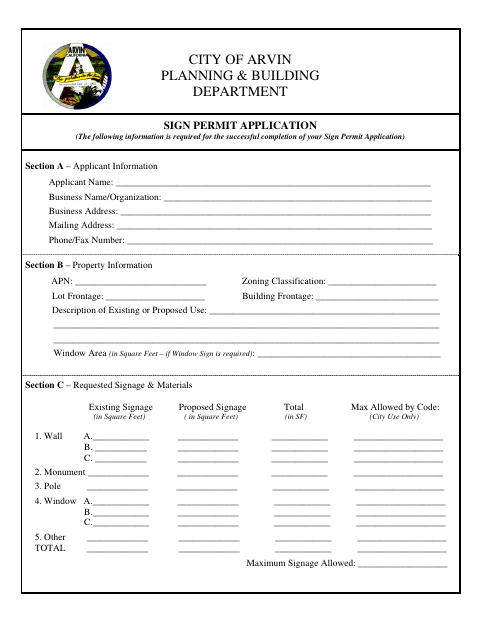
This application lets property and business owners request approval for proposed signage in Arvin and provide details about the property, signs, and materials.
What this form is
The City of Arvin Planning & Building Department Sign Permit Application requests information about the applicant, property, existing and proposed signs, and sign materials. Property owners authorize the filing, and the business owner signs and dates the application. The form lists a scaled plot plan, sign plans with measurements and colors, and elevations showing sign locations as required attachments.
Who needs it
Property owners and business owners seeking approval for proposed signage in Arvin can use this application and provide the listed plans and elevations.
How to submit it
Submit it to the city department named on the form; check the city website for current contact details.
About notarization
This application is signed and dated without a notary; it lists no sworn or notarized attachment, only plans and elevations to include with the application.
How to submit this form
- 1
Download The Application
Download the Sign Permit Application.
- 2
Complete The Application
Provide applicant, property, signage, and materials information; obtain the property owner and business owner signatures.
- 3
Gather The Listed Attachments
Include a scaled plot plan, sign plans showing measurements and colors, and elevations showing sign locations.
- 4
Submit To The City
Submit it to the city department named on the form; check the city website for current contact details.
Frequently asked questions
- What information does the Sign Permit Application request?
- It asks for applicant and property information, details about existing and proposed signs, sign materials, and signatures from the property owner and business owner.
- What attachments does the application list?
- The checklist lists a scaled plot plan showing property boundaries, signs, structures, landscaping, and dimensions; sign plans with measurements and colors; and elevations showing sign locations.
- Do I need a notary for the Sign Permit Application?
- No. This application is signed and dated without a notary. It lists plans and elevations as attachments, not sworn or notarized documents.
- How do I submit the Sign Permit Application?
- Submit it to the city department named on the form; check the city website for current contact details.