
Santa Clarita, CA · Los Angeles County
Building Owner Signature Authorization Form
This form lets a Santa Clarita property owner authorize another individual to sign on the owner’s behalf when obtaining an owner/builder permit for the property.
- California-licensed notary
- ~15 min average
- Notarized PDF emailed
What you’ll need
- Government-issued photo ID
- Webcam-enabled device (laptop or phone)
- This form, ready to upload as a PDF
What this form is
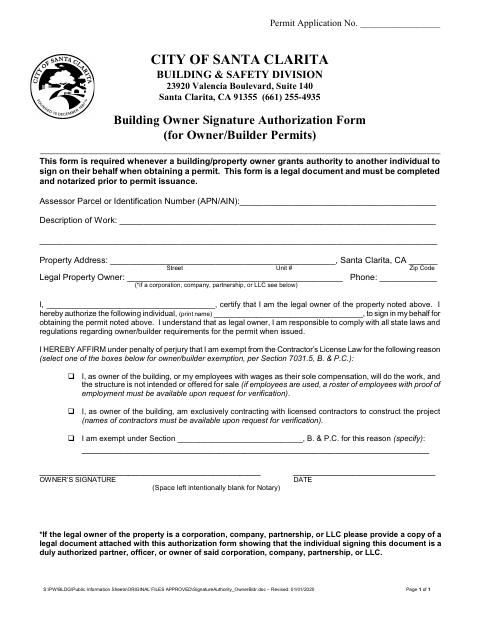
The City of Santa Clarita Building & Safety Division requires this form whenever a building or property owner authorizes someone else to sign on their behalf to obtain a permit. The owner identifies the property and work, names the authorized individual, certifies ownership, and selects an owner/builder exemption reason. The form must be completed and notarized before permit issuance; business entities must also attach a document showing the signer’s authority.
Who needs it
A property owner who wants another individual to sign on the owner’s behalf when obtaining an owner/builder permit must complete this form.
Why it needs a notary
The form provides blank space for a notary but specifies no jurat or acknowledgment; the property owner signs the authorization before the notary.
How to get this notarized
- 1
Download the Form
Get the Building Owner Signature Authorization Form from the City of Santa Clarita.
- 2
Fill In the Form
Provide the property, work, owner, and authorized signer details, then select an applicable owner/builder exemption reason.
- 3
Book an Online Notary
Arrange notarization with a commissioned online notary, and confirm the city accepts the notarization method if unsure.
- 4
Sign Before the Notary
The property owner signs the authorization before the notary; do not sign in advance.
- 5
Submit to the City
Submit the completed, notarized form before permit issuance. Include the required authority document if the owner is a business entity.
Preview the form
The blank PDF straight from Santa Clarita. Look it over, then upload your filled copy to start the notary session.

You’ll need ID and a webcam.
A licensed California online notary will join you on video, verify your government-issued ID, witness your signature, and apply their seal. You’ll receive the notarized PDF by email when the session ends.
Frequently asked questions
- How do I complete the owner signature authorization form?
- Enter the property and work details, identify the legal owner and authorized signer, select an exemption reason, then sign before a notary. Submit the completed form before permit issuance.
- Do I need to notarize this form before permit issuance?
- Yes. The form states that it must be completed and notarized prior to permit issuance. It provides blank space for the notary but does not specify a jurat or acknowledgment.
- Can I use an online notary for this form?
- Notaries commissioned in California cannot perform remote online notarization until the Secretary of State certifies the technology or 2030. California recognizes out-of-state notarizations under Civil Code §1189(b); confirm with the city if unsure.
- What must a company or LLC owner attach?
- The form says a corporation, company, partnership, or LLC must provide a copy of a legal document showing that the person signing is a duly authorized partner, officer, or owner.