
Seaside, CA · Monterey County
Sign Permit Application
Property owners or applicants use this application to request city review of proposed signs and provide project, contact, and sign-plan information.
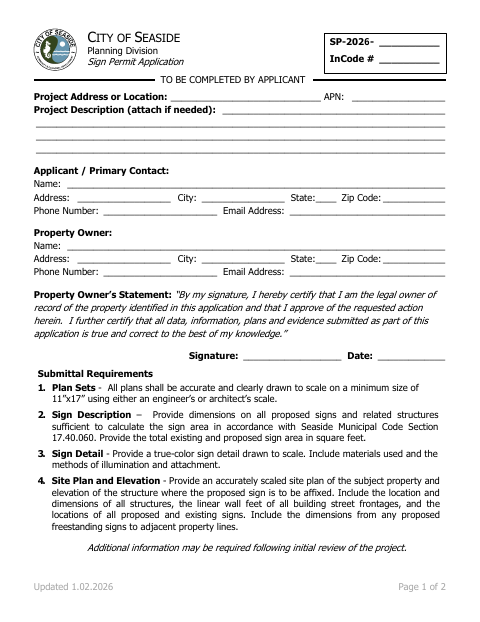
What this form is
The Planning Division’s Sign Permit Application is for proposed sign work and includes options for a nonconforming sign exception or temporary sign. It asks for the project location and description, applicant and property owner contact details, and the property owner’s signed approval. Applicants must provide scaled plans, sign dimensions and details, and site and elevation information; additional information may be required after initial review.
Who needs it
Property owners or applicants seeking a sign permit, nonconforming sign exception, or temporary sign submit this application with the required plans.
How to submit it
Submit electronic plans by email to [email protected] or on a USB drive in person, or submit physical plan sets. Pay in person, by phone through the project planner, or by mail; staff must accept the application and payment.
About notarization
This document is signed without a notary; the property owner signs and dates the statement, and the form identifies no notarized attachment or related step.
How to submit this form
- 1
Download The Application
Download the Sign Permit Application PDF.
- 2
Complete The Application
Enter the project location and description, applicant and property owner contact information, and obtain the property owner’s signed and dated statement.
- 3
Gather Required Plans
Prepare the scaled plans, sign description and detail, and site plan and elevation listed in the application.
- 4
Submit And Pay
Submit the application and plans electronically or as physical plan sets, and pay using one of the methods listed on the form.
Frequently asked questions
- Do I need a notary for the Sign Permit Application?
- No. This document is signed without a notary; the property owner signs and dates the statement, and the form identifies no notarized attachment or related step.
- How do I submit the Sign Permit Application?
- Send electronic plans by email to [email protected] or deliver them on a USB drive in person. Physical plans can also be submitted as sets; staff must accept the application and payment.
- What plans and details must I provide?
- The form calls for scaled plans, sign dimensions and total sign area, a true-color sign detail with materials and illumination and attachment methods, and a site plan and elevation.
- How can I pay for the application?
- The form lists payment in person by credit card, check, or cash; by credit card over the phone arranged by the project planner; or by check through the mail.