
Colton, CA · San Bernardino County
Notice of Merger Application
This application requests a merger of real property lots in Colton and is prepared by a qualified land surveyor or civil engineer for submission to the City.
- California-licensed notary
- ~15 min average
- Notarized PDF emailed
What you’ll need
- Government-issued photo ID
- Webcam-enabled device (laptop or phone)
- This form, ready to upload as a PDF
What this form is
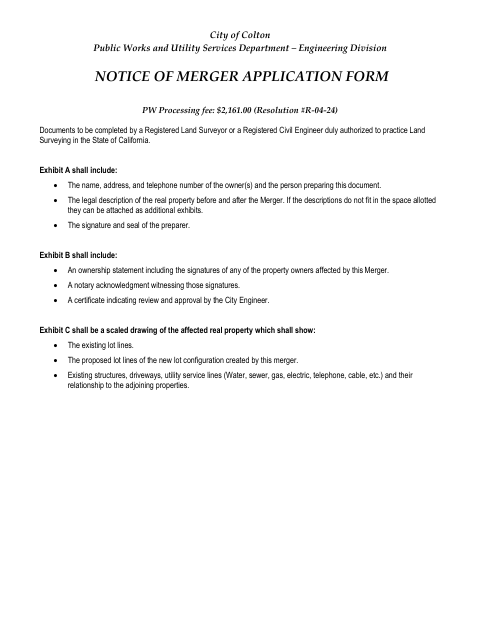
The application documents the property before and after the merger, identifies the affected owners, and includes a scaled drawing of the existing and proposed lot configuration. The city’s form calls for Exhibits A, B, and C, including an ownership statement with affected owners’ signatures and a notary acknowledgment. It also includes a City Engineer’s certificate and is submitted to the City of Colton Public Works Department.
Who needs it
Property owners affected by a proposed lot merger need this application, prepared by a registered land surveyor or qualified civil engineer, for submission to the City of Colton.
Why it needs a notary
Exhibit B includes a notary acknowledgment witnessing the signatures of affected property owners on the ownership statement; those owners sign before the notary.
How to get this notarized
- 1
Download The Application
Get the City of Colton Notice of Merger Application and review the form’s requirements for Exhibits A, B, and C.
- 2
Prepare The Exhibits
Have a qualified land surveyor or civil engineer prepare the required property descriptions and scaled drawing, and complete the ownership statement.
- 3
Book An Online Notary
Arrange a session with a commissioned online notary if the city accepts an out-of-state notarization for this form.
- 4
Sign On Video
Affected property owners sign the Exhibit B ownership statement before the notary, who completes the acknowledgment.
- 5
Submit To The City
Send the completed application and exhibits to the City of Colton Public Works Department as directed by the city.
Preview the form
The blank PDF straight from Colton. Look it over, then upload your filled copy to start the notary session.

You’ll need ID and a webcam.
A licensed California online notary will join you on video, verify your government-issued ID, witness your signature, and apply their seal. You’ll receive the notarized PDF by email when the session ends.
Frequently asked questions
- How do I complete the ownership statement?
- The form says affected property owners sign the Exhibit B ownership statement consenting to preparation and recordation of the merger document. The application also calls for a notary acknowledgment witnessing those signatures.
- Do I need a notary for this application?
- Yes. The form specifies a notary acknowledgment for the affected property owners’ signatures on the Exhibit B ownership statement. Owners should sign before the notary.
- Can I use an online notary for this form?
- California notaries cannot perform remote online notarization until the Secretary of State certifies the technology or 2030. California recognizes out-of-state notarizations under Civil Code §1189(b); an out-of-state commissioned online notary may be an option. Confirm with the city if unsure.
- What documents and exhibits does the application require?
- Exhibit A includes owner and preparer information, legal descriptions before and after the merger, and the preparer’s signature and seal. Exhibit B includes the ownership statement and acknowledgment; Exhibit C is a scaled drawing of the affected property.