
Lodi, CA · San Joaquin County
Agent Authorization for Contractor
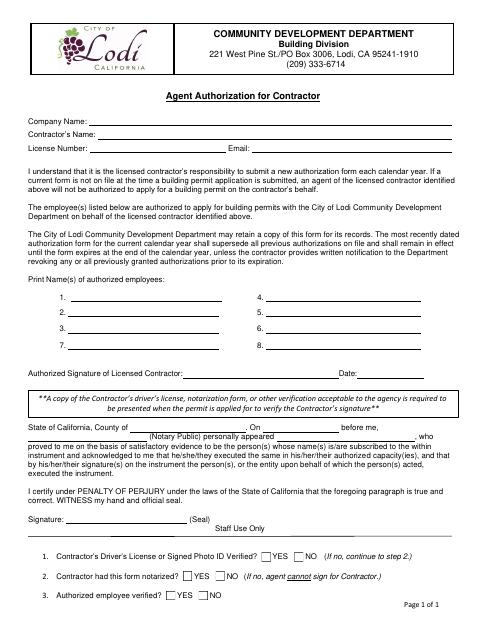
This form lets a licensed contractor authorize named employees to apply for building permits on the contractor’s behalf with the City of Lodi Community Development Department.
- California-licensed notary
- ~15 min average
- Notarized PDF emailed
What you’ll need
- Government-issued photo ID
- Webcam-enabled device (laptop or phone)
- This form, ready to upload as a PDF
What this form is
A licensed contractor lists the employees authorized to apply for building permits on the contractor’s behalf and signs the authorization. Lodi requires a current form to be on file when a building permit application is submitted; the authorization applies through the calendar year unless revoked earlier in writing. The city says an agent cannot sign for the contractor if the form has not been notarized, and may keep a copy for its records.
Who needs it
A licensed contractor who wants named employees to apply for City of Lodi building permits on the contractor’s behalf needs to complete this authorization.
Why it needs a notary
The form carries an acknowledgment and California perjury statement; the licensed contractor signs the authorization and acknowledges signing before the notary.
How to get this notarized
- 1
Download the Form
Get the Agent Authorization for Contractor form from the City of Lodi.
- 2
Fill In the Contractor Details
Enter the company name, contractor’s name, license number, email, and authorized employees.
- 3
Book an Online Notary
Arrange notarization with a commissioned online notary, subject to applicable California requirements.
- 4
Sign Before the Notary
The licensed contractor signs the authorization and acknowledges the signature before the notary.
- 5
Submit to the City
Provide the notarized form when the permit application is submitted, as required by the City of Lodi.
Preview the form
The blank PDF straight from Lodi. Look it over, then upload your filled copy to start the notary session.

You’ll need ID and a webcam.
A licensed California online notary will join you on video, verify your government-issued ID, witness your signature, and apply their seal. You’ll receive the notarized PDF by email when the session ends.
Frequently asked questions
- How do I authorize an employee to apply for permits?
- Complete the form with the contractor and license details, list the authorized employees, and have the licensed contractor sign before a notary. Submit the notarized form as required by the City.
- Do I need to notarize this contractor authorization?
- Yes. The form says an agent cannot sign for the contractor if the form has not been notarized. The licensed contractor signs the authorization and acknowledges the signature before the notary.
- Can I complete the notarization online?
- California notaries cannot perform remote online notarization until the Secretary of State certifies the technology or 2030. California recognizes out-of-state notarizations under Civil Code §1189(b); confirm with the city if unsure.
- How long does the authorization remain valid?
- The form says the latest dated authorization for the current calendar year replaces earlier authorizations and remains in effect until the end of that year, unless revoked earlier in writing.