
Scotts Valley, CA · Santa Cruz County
Request for Live Scan Service
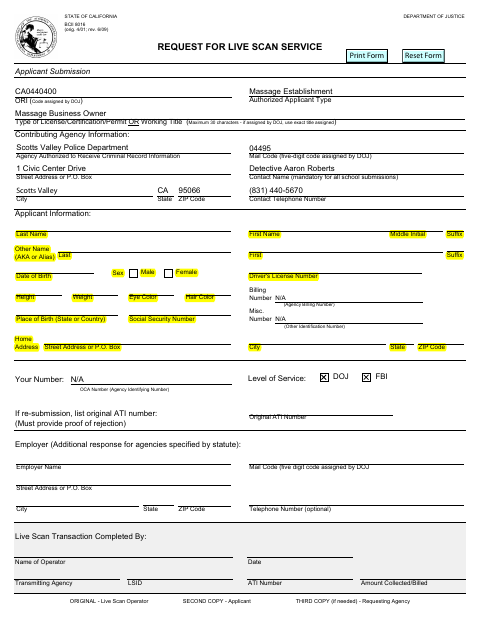
This fillable Live Scan request form collects applicant and agency information for people seeking fingerprint-based background checks through an authorized applicant.
What this form is
The form records information for a Live Scan transaction, including the applicant’s identifying details, the agency authorized to receive criminal record information, and the requested level of service. It also includes fields for employer information when applicable and transaction details completed by the Live Scan operator. If the request is a resubmission, the form says to provide proof of rejection and the original ATI number.
Who needs it
Applicants seeking Live Scan service use this form to provide identifying details and information about the agency receiving their criminal record information.
How to submit it
Submit it to the city department named on the form; check the city website for current contact details.
About notarization
This form has no notary block; it identifies applicant and Live Scan transaction information, with no notarized or sworn attachment or step listed.
How to submit this form
- 1
Download the Form
Download the Request for Live Scan Service PDF.
- 2
Complete the Applicant Details
Fill in the applicant, agency, and level-of-service fields that apply.
- 3
Gather Resubmission Proof
For a resubmission, provide proof of rejection and list the original ATI number.
- 4
Submit the Form
Submit it to the city department named on the form; check the city website for current contact details.
Frequently asked questions
- Do I need a notary for the Live Scan Service Request?
- No. The form has no notary block and lists no notarized or sworn attachment or step.
- What information does the Live Scan Service Request ask for?
- It asks for applicant identifying details, agency contact information, level of service, and, when applicable, employer information and resubmission details.
- How do I submit the Live Scan Service Request?
- The form does not provide submission instructions. Submit it to the city department named on the form; check the city website for current contact details.