
Greenwood Village, CO · Arapahoe County
Statement of Training
The Statement of Training is for a liquor or fermented malt beverage applicant to certify that staff involved in alcohol sales and service will complete an approved training course.
- licensed online notary
- ~15 min average
- Notarized PDF emailed
What you’ll need
- Government-issued photo ID
- Webcam-enabled device (laptop or phone)
- This form, ready to upload as a PDF
What this form is
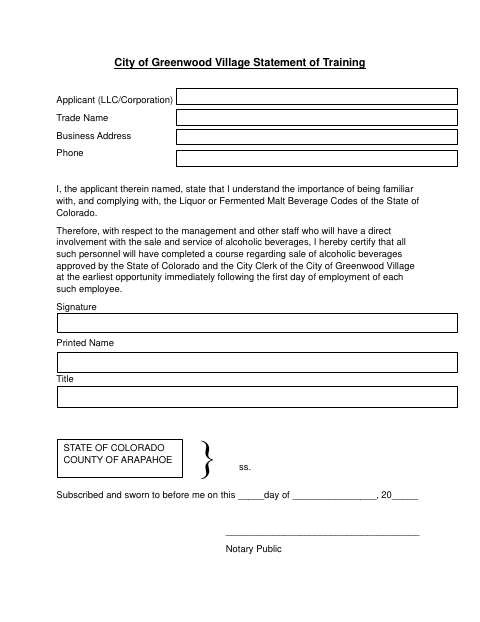
This form records the applicant’s certification that staff directly involved in selling or serving alcoholic beverages will complete a course approved by the State of Colorado and the City Clerk. It identifies the applicant, business, and signer, and includes a notarial jurat. The form text does not specify a filing deadline; it states that each employee will complete training at the earliest opportunity immediately following their first day of employment.
Who needs it
An applicant listed as an LLC or corporation uses this form to certify training plans for personnel directly involved in selling or serving alcoholic beverages.
Why it needs a notary
The form carries a State of Colorado and Arapahoe County jurat stating the signature was subscribed and sworn before the notary; the named applicant signs.
How to get this notarized
- 1
Download the Form
Get the Statement of Training from the City of Greenwood Village.
- 2
Fill In Applicant Details
Provide the applicant, trade name, business address, phone, and signer information requested on the form.
- 3
Book an Online Notary
Arrange an online notarization session before signing the jurat.
- 4
Sign on Video
The named applicant signs during the session and swears to the statement before the notary.
- 5
Submit to the City
Submit the completed form to the City Clerk as directed by the City of Greenwood Village.
Preview the form
The blank PDF straight from Greenwood Village. Look it over, then upload your filled copy to start the notary session.

You’ll need ID and a webcam.
A licensed online notary will join you on video, verify your government-issued ID, witness your signature, and apply their seal. You’ll receive the notarized PDF by email when the session ends.
Frequently asked questions
- How do I complete the Statement of Training?
- Enter the applicant and business details, have the applicant sign before a notary, and submit the completed form as directed by the City Clerk.
- Do I need to name the approved training course?
- The form asks the applicant to certify that staff will complete an approved course, but it has no course-name field. Contact the City Clerk about course approval.
- Can I sign this form with an online notary?
- Colorado permits remote online notarization by its notaries. Rush Notary can arrange a session with a commissioned online notary; confirm with the city or town if unsure whether it accepts a remotely notarized form.