
Littleton, CO · Arapahoe County
Development Plan Certification Blocks
This attachment provides certification blocks for Littleton development plans and plats, completed by property owners, designated agents, lenders, surveyors, or other parties as applicable.
- licensed online notary
- ~15 min average
- Notarized PDF emailed
What you’ll need
- Government-issued photo ID
- Webcam-enabled device (laptop or phone)
- This form, ready to upload as a PDF
What this form is
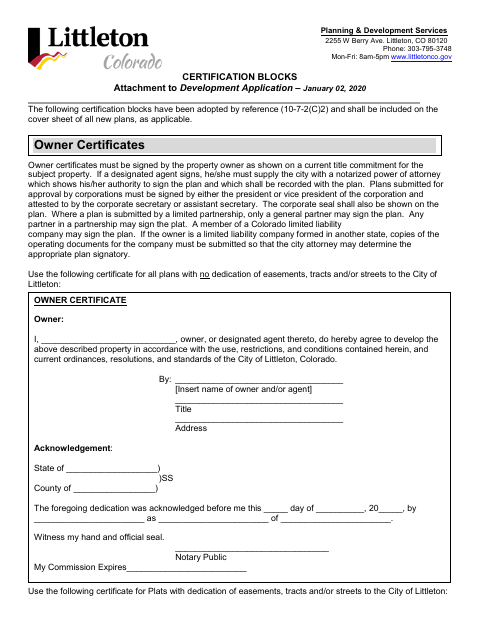
Littleton requires applicable certification blocks on the cover sheet of new plans, with specific certificates for plats, landscape improvements, site development plans, and other listed plan types. The attachment includes owner certifications, dedication language, and acknowledgment blocks, as well as certificates for lenders, surveyors, recording, and city approvals. Use the blocks that apply to the plan being submitted and follow the stated signing requirements for the owner or authorized signatory.
Who needs it
Property owners or authorized agents submitting applicable new plans or plats to Littleton use these blocks, along with other signatories required for the plan type.
Why it needs a notary
The owner dedication and deed-of-trust or lien-holder certificates carry acknowledgment blocks; the named owner, agent, or holder representative signs before the notary.
How to get this notarized
- 1
Download The Certification Blocks
Get the Littleton certification-blocks attachment and identify the certificates that apply to your plan.
- 2
Complete The Applicable Blocks
Fill in required owner, property, plan, and signatory details; follow the form's instructions for agents and business entities.
- 3
Book An Online Notary
Schedule a commissioned online notary for any signature that requires an acknowledgment.
- 4
Sign During The Video Session
Sign the applicable acknowledgment certificate in the notary's remote session.
- 5
Submit The Plan To Littleton
Include the applicable completed certification blocks with the plan submitted to the city.
Preview the form
The blank PDF straight from Littleton. Look it over, then upload your filled copy to start the notary session.

You’ll need ID and a webcam.
A licensed online notary will join you on video, verify your government-issued ID, witness your signature, and apply their seal. You’ll receive the notarized PDF by email when the session ends.
Frequently asked questions
- How do I use these certification blocks?
- Select the certificates that apply to your plan type, place them on the plan as directed, and complete the required information. The attachment says new plans must include applicable blocks on the cover sheet.
- Do I need to notarize every certificate?
- No. The attachment includes acknowledgment blocks for the owner dedication and deed-of-trust or lien-holder certificates. Other blocks have different requirements, so use the certificates applicable to your plan.
- Can I sign the acknowledgment with a commissioned online notary?
- Colorado law authorizes remote online notarization by a commissioned online notary under C.R.S. §24-21-514.5. Confirm with the city or town if unsure whether your plan submission can use an online-notarized certificate.
- Who may sign an owner certificate?
- The form says the owner must sign as shown on a current title commitment. A designated agent must provide a notarized power of attorney showing authority to sign, and the form lists additional signatory rules for business entities.