
Silt, CO · Garfield County
Residential Building Permit Application
This application packet covers residential building permits and related excavation or street-cut requests in Silt; property owners, contractors, and billable parties complete the sections relevant to their project.
- licensed online notary
- ~15 min average
- Notarized PDF emailed
What you’ll need
- Government-issued photo ID
- Webcam-enabled device (laptop or phone)
- This form, ready to upload as a PDF
What this form is
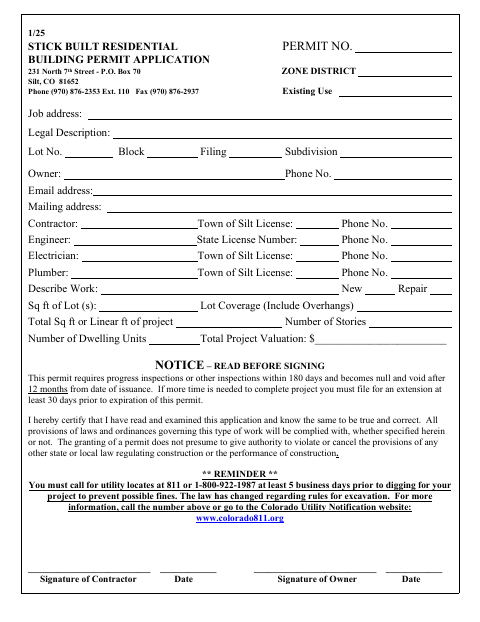
The packet includes a building permit application, excavation and street-cut requests, project checklists, and a Billable Party Agreement. Applicants provide property, project, and contractor details, submit plans and supporting materials, and acknowledge permit responsibilities. A notary block appears in the Billable Party Agreement, which includes a promise to reimburse the Town for specified costs. The packet says excavation in public ways requires a written town permit and limits excavation permits to no more than seven calendar days.
Who needs it
Property owners and contractors planning residential construction in Silt should complete the applicable permit sections and submit the plans and supporting materials the packet requests.
Why it needs a notary
The Billable Party Agreement carries a sworn-and-subscribed jurat; the billable party signs the agreement before the notary and swears or affirms its contents.
How to get this notarized
- 1
Download The Permit Packet
Download the Town of Silt residential permit packet and identify the sections that apply to your construction, excavation, or street-cut project.
- 2
Complete The Relevant Sections
Enter project and party details, complete the applicable checklists, and prepare the plans and other materials the packet requests.
- 3
Book An Online Notary
Arrange an online notarization for the Billable Party Agreement before signing it.
- 4
Sign And Swear On Video
Sign the agreement and swear or affirm its contents before a commissioned online notary during the video session.
- 5
Submit The Packet To The Town
Submit the completed sections, notarized agreement, plans, and supporting materials to the Town of Silt as directed.
Preview the form
The blank PDF straight from Silt. Look it over, then upload your filled copy to start the notary session.

You’ll need ID and a webcam.
A licensed online notary will join you on video, verify your government-issued ID, witness your signature, and apply their seal. You’ll receive the notarized PDF by email when the session ends.
Frequently asked questions
- Which part of the packet needs notarization?
- The Billable Party Agreement has a notary block stating that the document is sworn to and subscribed before a notary. The other application signatures shown do not include a notary block.
- How do I get the Billable Party Agreement notarized online?
- Complete the agreement, then book with a commissioned online notary. Sign and swear or affirm the document during the video session, and follow the Town’s instructions for submitting the packet.
- Do I need to notarize the entire permit application?
- The packet shows a notary block for the Billable Party Agreement, not for every application or checklist signature. Confirm with the city or town if unsure.
- Can I use a commissioned online notary for this form?
- Colorado authorizes its notaries to perform remote online notarizations under C.R.S. §24-21-514.5. C.R.S. §24-21-511 recognizes certain notarial acts performed by a notary public or other authorized officer of another state.