
Wheat Ridge, CO · Jefferson County
Business and Tax License Application
This application registers a business for Wheat Ridge business and tax licensing; business owners or authorized agents complete and submit it with the required fee and any applicable supplements.
- licensed online notary
- ~15 min average
- Notarized PDF emailed
What you’ll need
- Government-issued photo ID
- Webcam-enabled device (laptop or phone)
- This form, ready to upload as a PDF
What this form is
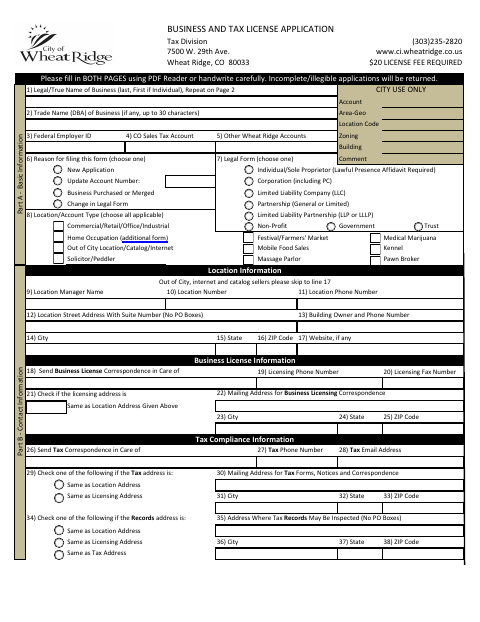
Wheat Ridge uses this form to review businesses seeking a city business and tax license, including businesses that collect sales tax or operate without a fixed location in the city. Applicants provide business, ownership, address, activity, tax, and emergency-contact details, then submit the signed application and fee to the City Tax Division. Individuals and sole proprietors must also submit the included Lawful Presence Affidavit; other supplemental registrations may apply to certain businesses.
Who needs it
Businesses operating or collecting sales tax in Wheat Ridge must apply, including some businesses without a fixed city location; individuals and sole proprietors also submit the affidavit.
Why it needs a notary
The Lawful Presence Affidavit has an acknowledgment before a notary public; the individual or sole proprietor applicant signs it, and a property owner or authorized agent signs the included permission certificate before a notary.
How to get this notarized
- 1
Download The Application
Get the Business and Tax License Application and review its instructions to identify any supplements your business needs.
- 2
Fill In The Required Fields
Complete both application pages and any applicable affidavit or supplement. The city warns that incomplete or illegible applications will be returned.
- 3
Book An Online Notary
If you need a notarized affidavit or property permission certificate, book a session with a commissioned online notary.
- 4
Sign During The Video Session
Sign the document requiring notarization while meeting the commissioned online notary by video.
- 5
Submit To Wheat Ridge
Submit the signed application, required notarized documents, identification copy when applicable, and fee to the City Tax Division.
Preview the form
The blank PDF straight from Wheat Ridge. Look it over, then upload your filled copy to start the notary session.

You’ll need ID and a webcam.
A licensed online notary will join you on video, verify your government-issued ID, witness your signature, and apply their seal. You’ll receive the notarized PDF by email when the session ends.
Frequently asked questions
- How do I notarize the Lawful Presence Affidavit?
- Complete the affidavit, then sign it during a video session with a commissioned online notary. Include a clear, legible copy of an authorized identification document when submitting the notarized affidavit.
- Do I need to notarize the full business license application?
- The application requires the applicant’s signature, but its instructions do not require that signature to be notarized. Individuals and sole proprietors must submit the included notarized Lawful Presence Affidavit.
- Can I use an online notary for this form?
- Colorado authorizes remote online notarization by a commissioned online notary under C.R.S. §24-21-514.5. Check that Wheat Ridge accepts the notarized document in the format you plan to submit.
- When should I submit the application?
- The city says review may take three to four weeks and advises applying with enough time for review and approval before starting business. Submit the signed registration and applicable fee to the Wheat Ridge Tax Division.
- What if I am unsure whether my business needs a supplement?
- Some business types require supplemental registrations and fees, and the form says to ask the city about other licenses. Confirm with the city or town if unsure.