
Moffat, CO · Saguache County
Sole Proprietor Lawful Presence Affidavit
The Lawful Presence Affidavit is for sole proprietors applying for a Town of Moffat public benefit and states their lawful-presence category under oath on this form.
- licensed online notary
- ~15 min average
- Notarized PDF emailed
What you’ll need
- Government-issued photo ID
- Webcam-enabled device (laptop or phone)
- This form, ready to upload as a PDF
What this form is
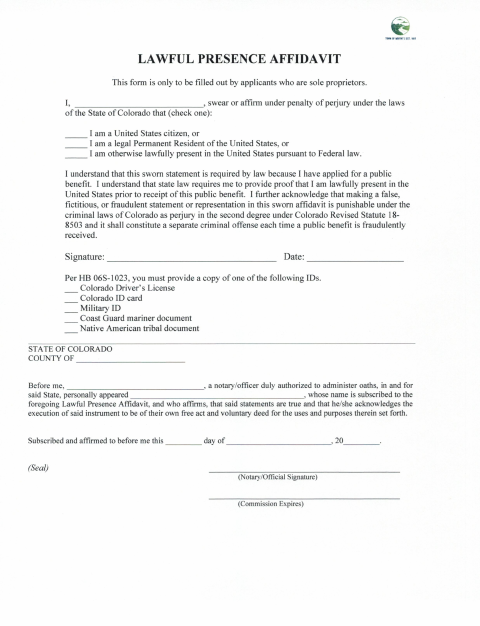
The Town of Moffat form is only for applicants who are sole proprietors. It asks the applicant to affirm under oath that they are a U.S. citizen, a lawful permanent resident, or otherwise lawfully present, and says proof of lawful presence is required before receiving the public benefit. The form also requests a copy of one listed ID and includes a notarial section.
Who needs it
A sole proprietor who has applied for a Town of Moffat public benefit and must submit a sworn lawful-presence statement with a copy of an accepted ID needs this form.
How to get this notarized
- 1
Download the Affidavit
Download the Town of Moffat Lawful Presence Affidavit for sole proprietors.
- 2
Fill Out the Form
Select the applicable lawful-presence statement and prepare a copy of one ID listed on the form.
- 3
Book an Online Notary
Schedule an appointment with a commissioned online notary.
- 4
Sign on Video
Sign and affirm the affidavit during the online notary session.
- 5
Submit to the Town
Send the notarized affidavit and ID copy to the Town of Moffat as part of your public-benefit application.
Preview the form
The blank PDF straight from Moffat. Look it over, then upload your filled copy to start the notary session.

You’ll need ID and a webcam.
A licensed online notary will join you on video, verify your government-issued ID, witness your signature, and apply their seal. You’ll receive the notarized PDF by email when the session ends.
Frequently asked questions
- How do I complete the Moffat lawful presence affidavit?
- Choose the applicable lawful-presence statement, sign and affirm the form before a notary or authorized officer, attach a copy of one listed ID, and submit it to the Town of Moffat.
- Do I need to sign the affidavit in front of a notary?
- Yes. The form includes a “Subscribed and affirmed” notarial section and asks the named applicant to affirm the statements before a notary or authorized officer.
- Can I use a commissioned online notary?
- Colorado authorizes remote online notarization by its notaries under C.R.S. §24-21-514.5, and C.R.S. §24-21-511 recognizes certain acts by an out-of-state notary or authorized officer. Confirm with the city or town if unsure.
- Which ID copies does the form list?
- The form lists a Colorado driver’s license, Colorado ID card, military ID, Coast Guard mariner document, or Native American tribal document.