
Dacono, CO · Weld County
Cost Agreement and Funds Deposit Agreement
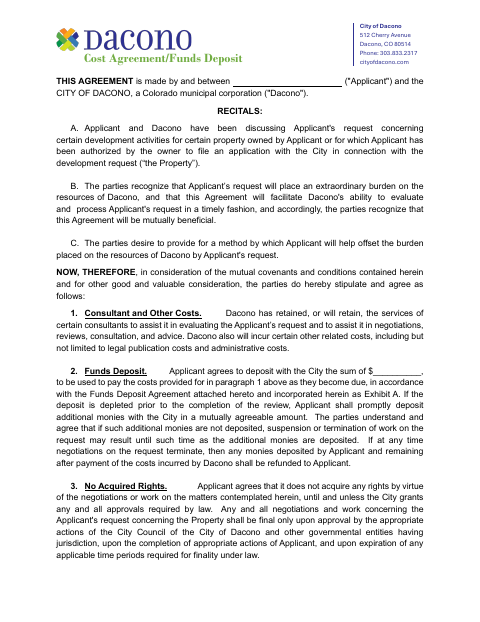
This agreement sets out how an applicant funds Dacono’s review costs for a development request and is filed by the applicant seeking city review of property-related development activities.
- licensed online notary
- ~15 min average
- Notarized PDF emailed
What you’ll need
- Government-issued photo ID
- Webcam-enabled device (laptop or phone)
- This form, ready to upload as a PDF
What this form is
Dacono uses this agreement when an applicant’s development request will require consultant, legal publication, administrative, or other related city costs. The applicant agrees to deposit funds for those costs and may need to replenish the deposit if it runs low; remaining funds are refundable after costs are paid when work is completed or negotiations end. The form also includes a funds deposit agreement and invoice information for project and billing contacts.
Who needs it
An applicant requesting city review of development activities for property in Dacono must complete the agreement and provide the requested deposit and project billing information.
How to get this notarized
- 1
Download The Agreement
Download the Cost Agreement and Funds Deposit Agreement from the City of Dacono.
- 2
Fill In The Form
Enter applicant, project, deposit, and billing details. Attach landowner authorization if the applicant is not the property owner.
- 3
Book An Online Notary
Arrange a remote online notarization appointment for the applicant who will sign the agreement.
- 4
Sign On Video
Show identification, meet with the commissioned online notary by video, and sign as directed.
- 5
Submit To The City
Submit the notarized agreement and any required attachments to the City of Dacono.
Preview the form
The blank PDF straight from Dacono. Look it over, then upload your filled copy to start the notary session.

You’ll need ID and a webcam.
A licensed online notary will join you on video, verify your government-issued ID, witness your signature, and apply their seal. You’ll receive the notarized PDF by email when the session ends.
Frequently asked questions
- How do I complete the Cost Agreement and Funds Deposit Agreement?
- Complete the applicant, project, deposit, and billing details, then have the applicant’s signature notarized. Provide any required landowner authorization and submit the completed agreement to the City of Dacono.
- Do I need to sign the agreement in front of a notary?
- Yes. The form includes a jurat stating the applicant’s signature was subscribed under oath before a notary. The applicant signer should sign before the notary.
- Can I use a commissioned online notary?
- Colorado authorizes remote online notarization for its own notaries under C.R.S. §24-21-514.5. Confirm with the city or town if unsure whether Dacono will accept your remotely notarized agreement.
- What happens if the deposit runs out?
- The agreement says the applicant must promptly deposit additional funds in a mutually agreeable amount. Work on the request may be suspended or terminated if additional funds are not deposited.