
Easton, CT · Fairfield County
FOIA Waiver of Fees Affidavit
This affidavit lets an Easton resident ask for a waiver of Freedom of Information Act fees by stating they receive public assistance or cannot pay due to indigence.
- licensed online notary
- ~15 min average
- Notarized PDF emailed
What you’ll need
- Government-issued photo ID
- Webcam-enabled device (laptop or phone)
- This form, ready to upload as a PDF
What this form is
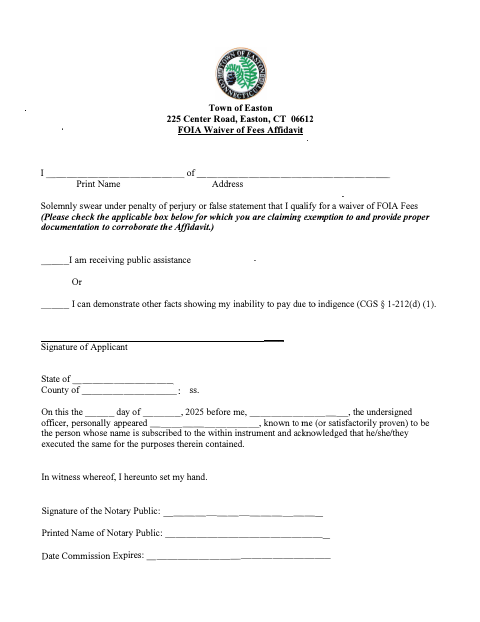
Use this affidavit to ask the Town of Easton to waive fees related to a Freedom of Information Act request. The applicant solemnly swears that they receive public assistance or can demonstrate other facts showing inability to pay due to indigence, and must provide supporting documentation. The form includes a notarial acknowledgment and asks for the applicant’s signature and the notary’s details.
Who needs it
An Easton resident requesting a waiver of FOIA fees who receives public assistance or can document an inability to pay due to indigence may use this affidavit.
Why it needs a notary
The form carries an acknowledgment block; the applicant signs the affidavit and acknowledges its execution before the notary, who completes the officer and commission details.
How to get this notarized
- 1
Download the Affidavit
Get the FOIA Waiver of Fees Affidavit from the Town of Easton.
- 2
Complete the Form
Enter your name and address, select the applicable fee-waiver basis, and prepare supporting documentation.
- 3
Book an Online Notary
Schedule a video appointment with a commissioned online notary.
- 4
Sign on Video
Sign and acknowledge the affidavit during the online notarization session.
- 5
Submit to the Town
Send the notarized affidavit and supporting documentation with your FOIA fee waiver request to the Town of Easton.
Preview the form
The blank PDF straight from Easton. Look it over, then upload your filled copy to start the notary session.

You’ll need ID and a webcam.
A licensed online notary will join you on video, verify your government-issued ID, witness your signature, and apply their seal. You’ll receive the notarized PDF by email when the session ends.
Frequently asked questions
- How do I get the FOIA fee waiver affidavit notarized?
- Complete the affidavit, then book a video session with a commissioned online notary. Sign and acknowledge the document during the session, and submit it with supporting documentation.
- Do I need to provide proof with this affidavit?
- Yes. The form asks applicants to provide proper documentation to corroborate their claim of receiving public assistance or being unable to pay due to indigence.
- Can I sign this affidavit with an online notary?
- Connecticut authorizes remote online notarization for its own notaries under Public Act 23-28, effective October 1, 2023. Ask the town clerk if you are unsure whether the Town will accept your notarized affidavit.
- Where should I submit the completed affidavit?
- The form is addressed to the Town of Easton. Submit the completed affidavit and supporting documentation with your FOIA fee waiver request; confirm with the town clerk if unsure.