
Simsbury, CT · Hartford County
Tax Exempt Supplemental Return
Organizations file this return with the assessor to report newly acquired or newly constructed property, or to request an additional exemption for property not previously exempt.
- licensed online notary
- ~15 min average
- Notarized PDF emailed
What you’ll need
- Government-issued photo ID
- Webcam-enabled device (laptop or phone)
- This form, ready to upload as a PDF
What this form is
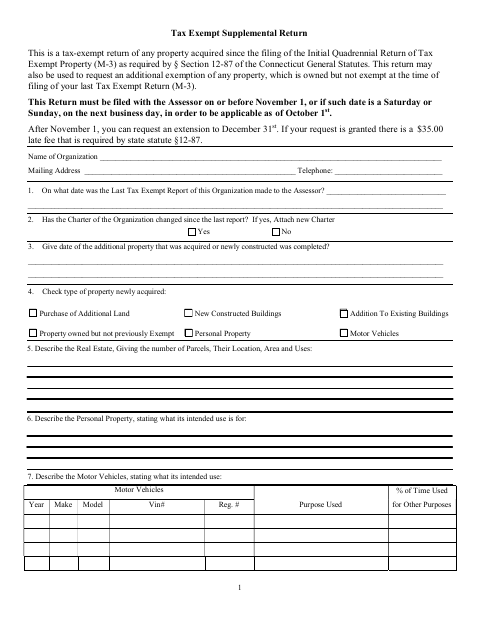
Use this return to report property acquired since the organization’s initial quadrennial tax-exempt return or to request an additional exemption for property it owns. The form asks about the organization, property types and uses, and whether property is rented or used for other purposes. It says to file with the Assessor on or before November 1 for applicability as of October 1; after November 1, an extension to December 31 may be requested.
Who needs it
An organization seeking to report newly acquired property or request an additional exemption for property not previously exempt files this return with the Simsbury Assessor.
Why it needs a notary
The treasurer or another chief financial officer signs under oath, with the form’s “Subscribed and Sworn to before me” block completed by an authorized notarial officer.
How to get this notarized
- 1
Download the Return
Download the Tax Exempt Supplemental Return from the Simsbury town website.
- 2
Complete the Form
Enter organization and property information, answer the questions, and have the treasurer or another chief financial officer prepare to sign under oath.
- 3
Book an Online Notary
Schedule a session with a commissioned online notary and have the completed form ready.
- 4
Sign on Video
Sign the declaration under oath during the video session so the notary can complete the sworn-to block.
- 5
Submit to the Assessor
File the completed return with the Assessor by the deadline stated on the form.
Preview the form
The blank PDF straight from Simsbury. Look it over, then upload your filled copy to start the notary session.

You’ll need ID and a webcam.
A licensed online notary will join you on video, verify your government-issued ID, witness your signature, and apply their seal. You’ll receive the notarized PDF by email when the session ends.
Frequently asked questions
- How do I get the supplemental return notarized online?
- Complete the return, then book a commissioned online notary. Sign under oath during the video session so the notary can complete the form’s “Subscribed and Sworn to before me” block.
- Do I need to sign this form in front of a notary?
- Yes. The form includes a “Subscribed and Sworn to before me” block for the treasurer or another chief financial officer signing the declaration under oath.
- Can a commissioned online notary notarize this return?
- Connecticut authorizes remote online notarization for its own notaries under Public Act 23-28, codified at Conn. Gen. Stat. §3-95b, effective October 1, 2023. Conn. Gen. Stat. §1-57 recognizes qualifying notarial acts performed outside Connecticut.
- Where do I submit the completed return?
- The form says to file it with the Assessor. Confirm the filing process and any questions about your submission with the town clerk if unsure.