
Bridgewater, CT · Litchfield County
Revised Construction Value Form
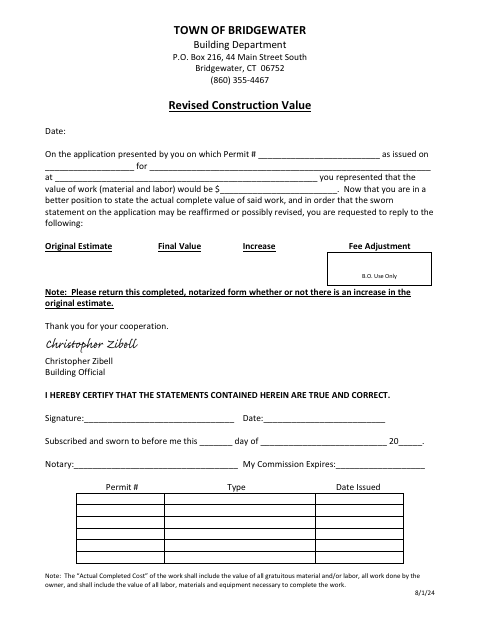
Bridgewater’s Revised Construction Value Form lets a permit applicant report the completed value of permitted work to the town’s Building Department and reaffirm or revise the original estimate.
- licensed online notary
- ~15 min average
- Notarized PDF emailed
What you’ll need
- Government-issued photo ID
- Webcam-enabled device (laptop or phone)
- This form, ready to upload as a PDF
What this form is
Bridgewater’s Building Department requests this form after permitted work is complete, when the applicant can state its actual value and reaffirm or revise the estimate on the permit application. Return the completed, notarized form whether or not the final value exceeds the original estimate. The stated value should include materials and labor, including work done by the owner and gratuitous materials or labor, as well as equipment needed to complete the work.
Who needs it
The applicant for a Bridgewater building permit should complete and return this form after the work is complete, whether or not its value differs from the original estimate.
Why it needs a notary
The form includes a subscribed-and-sworn jurat; the person certifying the statements signs and swears before a notary, who completes the notary and commission-expiration fields.
How to get this notarized
- 1
Download the Form
Get Bridgewater’s Revised Construction Value Form from the town website.
- 2
Fill In the Project Details
Enter the permit and project information, then report the original estimate and final value.
- 3
Book an Online Notary
Arrange a remote notarization with a commissioned online notary.
- 4
Sign on Video
Sign and swear to the certification during the online notary session.
- 5
Submit to the Town
Return the completed, notarized form to Bridgewater’s Building Department, even if there is no increase.
Preview the form
The blank PDF straight from Bridgewater. Look it over, then upload your filled copy to start the notary session.

You’ll need ID and a webcam.
A licensed online notary will join you on video, verify your government-issued ID, witness your signature, and apply their seal. You’ll receive the notarized PDF by email when the session ends.
Frequently asked questions
- How do I submit the Revised Construction Value Form?
- Complete the form, have the certification sworn before a notary, and return the notarized form to Bridgewater’s Building Department. The form says to return it even if the final value has not increased.
- Do I need to have this form notarized?
- Yes. The form requests a completed, notarized return and includes a subscribed-and-sworn jurat for the person certifying the statements.
- Can I use a commissioned online notary?
- Connecticut authorizes remote online notarization by its own notaries under Public Act 23-28, effective October 1, 2023. Conn. Gen. Stat. §1-57 recognizes qualifying notarial acts performed outside Connecticut; confirm the town’s submission requirements if unsure.
- What costs should I include in the final value?
- The form says to include materials and labor, gratuitous materials or labor, work done by the owner, and the labor, materials, and equipment needed to complete the work. Confirm with the town clerk if unsure.