
Durham, CT · Middlesex County
Pistol Permit and Eligibility Certificate Application
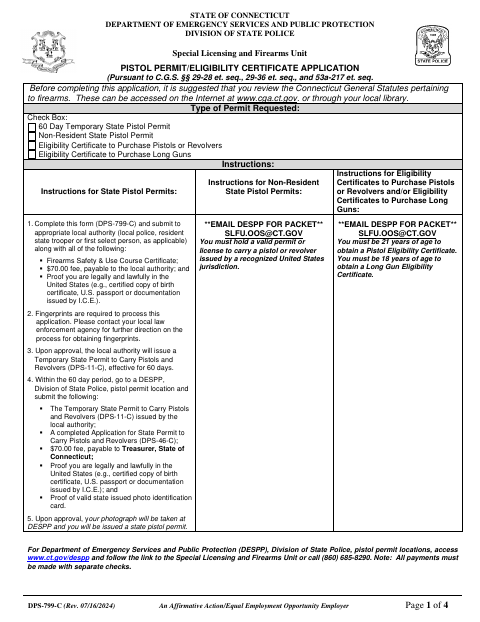
This four-page application lets Connecticut residents request a temporary state pistol permit, a non-resident state pistol permit, or an eligibility certificate to purchase pistols, revolvers, or long guns.
- licensed online notary
- ~15 min average
- Notarized PDF emailed
What you’ll need
- Government-issued photo ID
- Webcam-enabled device (laptop or phone)
- This form, ready to upload as a PDF
What this form is
Applicants use the form to provide identifying, residence, employment, permit-history, medical, criminal, military, and training information and to declare that their answers are true and correct. The application instructs applicants to submit it with required supporting documents and a fee to the appropriate local authority, such as the first selectperson when applicable; contact Durham’s local authority about its submission process.
Who needs it
Applicants seeking a permit or eligibility certificate listed on the form must complete it and submit it with the required documents to the appropriate local authority.
Why it needs a notary
The applicant signs a declaration under penalties of false statement, with a subscribed-and-sworn jurat requiring the applicant to sign before the notary.
How to get this notarized
- 1
Download the Application
Get the DPS-799-C application and review which permit or eligibility certificate you are requesting.
- 2
Fill Out the Form
Complete the applicant sections and gather the supporting documents and training certificate specified on the form.
- 3
Book an Online Notary
Schedule a video appointment with a commissioned online notary for the sworn declaration.
- 4
Sign on Video
Sign the declaration during the online notarization when the notary instructs you.
- 5
Submit to the Local Authority
Submit the notarized application, required documents, and fee to the appropriate local authority as directed.
Preview the form
The blank PDF straight from Durham. Look it over, then upload your filled copy to start the notary session.

You’ll need ID and a webcam.
A licensed online notary will join you on video, verify your government-issued ID, witness your signature, and apply their seal. You’ll receive the notarized PDF by email when the session ends.
Frequently asked questions
- How do I get the application notarized online?
- Complete the form, then book an appointment with a commissioned online notary. Sign the declaration during the video session when instructed, and follow the local authority’s directions for submitting the application.
- Do I need to sign in front of a notary?
- Yes. The application includes a declaration under penalties of false statement and a subscribed-and-sworn jurat. The applicant must sign before the notary.
- Can this application be notarized remotely?
- Connecticut authorizes its own notaries to perform remote online notarizations under Public Act 23-28, effective October 1, 2023. Connecticut law also recognizes certain notarial acts performed outside the state by an authorized officer.
- Where do I submit the completed application?
- The form says to submit it to the appropriate local authority, such as the first selectperson when applicable, with required documents and the local fee. Confirm with the town clerk if unsure.
Other forms in Durham
Pistol Permit and Eligibility Certificate Application in other Middlesex County cities
Each city publishes its own version of this form. Pick the city where you’re filing.