
Meriden, CT · New Haven County
Affidavit to Identify a Void Racially Restrictive Covenant
This affidavit lets a record owner or co-owner identify a racially restrictive covenant affecting property in Meriden and affirm that the covenant is void.
- licensed online notary
- ~15 min average
- Notarized PDF emailed
What you’ll need
- Government-issued photo ID
- Webcam-enabled device (laptop or phone)
- This form, ready to upload as a PDF
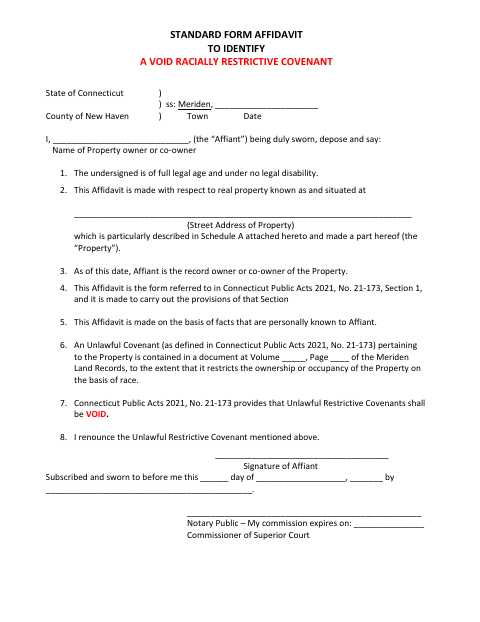
What this form is
Meriden’s one-page affidavit is for a property’s record owner or co-owner to identify an unlawful covenant in the Meriden Land Records that restricts ownership or occupancy based on race. The affiant states that they personally know the facts, identifies the property and the land-record volume and page, and renounces the covenant. The form refers to Schedule A for the property description and must be sworn before a notary or Commissioner of Superior Court.
Who needs it
A record owner or co-owner of Meriden property may use this form to identify and renounce a racially restrictive covenant recorded against the property.
How to get this notarized
- 1
Download the Affidavit
Get the Meriden Affidavit to Identify a Void Racially Restrictive Covenant and review its fields.
- 2
Complete the Form
Enter the property and land-record details, review the statements, and prepare the Schedule A property description referenced by the form.
- 3
Book an Online Notary
Schedule a video appointment with a commissioned online notary and have the completed form ready.
- 4
- 5
Submit to the City
Follow the city’s instructions for submitting the notarized affidavit and ask the town clerk about land-record filing questions.
Preview the form
The blank PDF straight from Meriden. Look it over, then upload your filled copy to start the notary session.

You’ll need ID and a webcam.
A licensed online notary will join you on video, verify your government-issued ID, witness your signature, and apply their seal. You’ll receive the notarized PDF by email when the session ends.
Frequently asked questions
- How do I get this Meriden affidavit notarized online?
- Complete the affidavit, then book an online appointment. Sign during the video session before a commissioned online notary, who completes the jurat.
- Do I need to sign this affidavit in front of a notary?
- Yes. The form says it must be subscribed and sworn to before a notary or Commissioner of Superior Court. Sign before the notary completes the jurat.
- Can this form be notarized remotely in Connecticut?
- Connecticut authorizes remote online notarization for its own notaries under Public Act 23-28, codified at Conn. Gen. Stat. §3-95b. Confirm the receiving office accepts a remotely notarized form.
- Where should I ask about filing the affidavit?
- The form refers to the Meriden Land Records. For filing instructions or questions about the record, contact the town clerk; confirm with the town clerk if unsure.
Affidavit to Identify a Void Racially Restrictive Covenant in other Connecticut cities
Each city publishes its own version of this form. Pick the city where you’re filing.