
Preston, CT · New London County
Short-Term Rental Permit
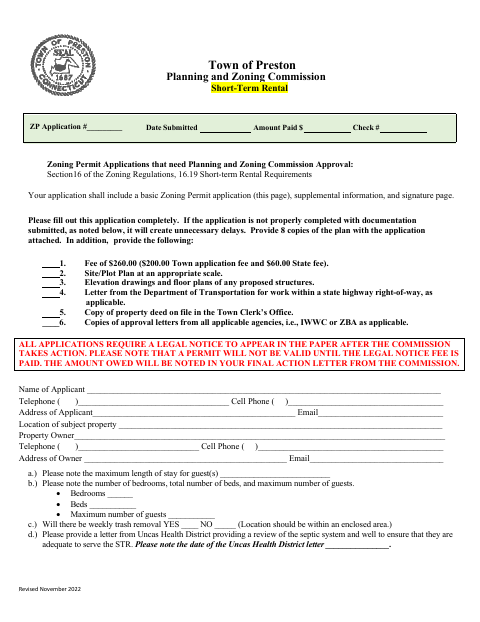
Preston property owners and applicants use this four-page application to seek Planning and Zoning Commission approval for a short-term rental and provide required property details, supporting documents, and signatures.
- licensed online notary
- ~15 min average
- Notarized PDF emailed
What you’ll need
- Government-issued photo ID
- Webcam-enabled device (laptop or phone)
- This form, ready to upload as a PDF
What this form is
The application requests information about the property, rental occupancy, waste removal, emergency contacts, and related site conditions. Applicants must submit supporting materials, including a site or plot plan, a copy of the deed on file in the Town Clerk’s Office, and a notarized owner/applicant letter addressing Section 16.19.2; the attached agreement sets out rental requirements. The application also grants permission for town representatives to access the property for inspections.
Who needs it
Property owners or applicants seeking Planning and Zoning Commission approval to operate a short-term rental in Preston should submit this application and its required supporting materials.
Why it needs a notary
The attached agreement has a notarial acknowledgment stating the signer appeared and signed in the notary’s presence; the owner or applicant signs before the notary.
How to get this notarized
- 1
Download the Application
Get Preston’s Short-Term Rental Permit application and attached agreement.
- 2
Complete the Forms
Fill in the applicant, owner, property, rental, and contact details, and gather the supporting documents listed on the application.
- 3
Book an Online Notary
Schedule a remote session with a commissioned online notary for the owner/applicant acknowledgment.
- 4
Sign on Video
Sign the agreement in the notary’s presence during the online video session.
- 5
Submit to Preston
Submit the completed application, notarized agreement, and required supporting materials to the Town of Preston Planning and Zoning Commission.
Preview the form
The blank PDF straight from Preston. Look it over, then upload your filled copy to start the notary session.

You’ll need ID and a webcam.
A licensed online notary will join you on video, verify your government-issued ID, witness your signature, and apply their seal. You’ll receive the notarized PDF by email when the session ends.
Frequently asked questions
- How do I get the short-term rental agreement notarized?
- Complete the application and agreement, then book a session with a commissioned online notary. Sign the agreement during the video session and submit it with the required materials to Preston.
- Do I need to notarize the entire permit application?
- The form calls for a notarized owner/applicant letter addressing Section 16.19.2 and includes an acknowledgment on the attached agreement. Follow the town’s submission instructions if you are unsure which pages to notarize.
- Can I use remote online notarization for this form?
- Connecticut authorizes remote online notarization for its own notaries under Public Act 23-28, codified at Conn. Gen. Stat. §3-95b, effective October 1, 2023. Conn. Gen. Stat. §1-57 recognizes qualifying notarial acts performed outside Connecticut.
- Where do I submit the application and deed copy?
- The form requests the application and a copy of the property deed on file in the Town Clerk’s Office. For submission details or deed questions, confirm with the town clerk if unsure.