
Salem, CT · New London County
Demolition Application
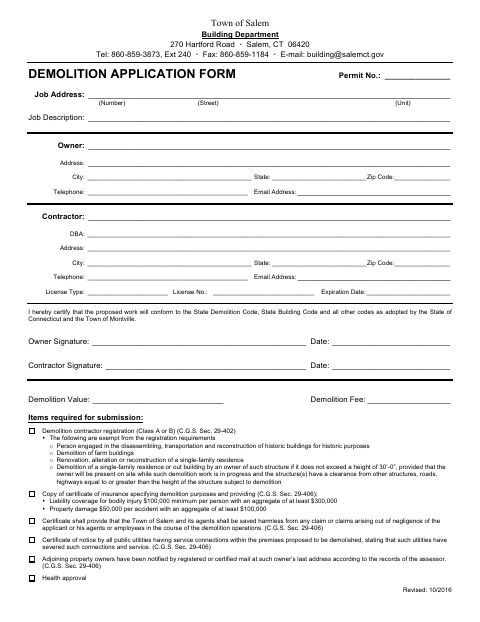
The Town of Salem Demolition Application collects project, owner, and contractor details and includes health district requirements for property owners or contractors applying to demolish a structure.
- licensed online notary
- ~15 min average
- Notarized PDF emailed
What you’ll need
- Government-issued photo ID
- Webcam-enabled device (laptop or phone)
- This form, ready to upload as a PDF
What this form is
The application asks for the job address, owner and contractor information, proposed work, and demolition value, and lists documents required for submission. It also includes a Connecticut Department of Public Health demolition notification and Uncas Health District requirements, including a sworn certification that specified demolition requirements have been met. The form says the notarized health district section must be returned before the District will sign off for the demolition.
Who needs it
Property owners or contractors seeking demolition approval for a structure in Salem should complete the application and address the listed submission requirements.
How to get this notarized
- 1
Download the Application
Get the Demolition Application from the Town of Salem and review its application, health notification, and health district sections.
- 2
Fill Out the Form
Complete the applicable project and contact details, and gather the documents listed for submission.
- 3
Book an Online Notary
Schedule a session with a commissioned online notary for the owner or contractor’s sworn certification.
- 4
Sign on Video
Show identification and sign the certification during the notary’s video session, following the notary’s instructions.
- 5
Submit the Form
Return the notarized health district section to Uncas Health District and submit the application and required materials as directed.
Preview the form
The blank PDF straight from Salem. Look it over, then upload your filled copy to start the notary session.

You’ll need ID and a webcam.
A licensed online notary will join you on video, verify your government-issued ID, witness your signature, and apply their seal. You’ll receive the notarized PDF by email when the session ends.
Frequently asked questions
- How do I get the demolition application notarized online?
- Complete the form, then book with a commissioned online notary. Sign the sworn certification during the video session, and follow the form’s instructions to return it to Uncas Health District.
- Do I need to sign the form in front of a notary?
- Yes. The Uncas Health District section says the form must be notarized and includes a jurat for the owner or contractor’s oath about the stated requirements.
- What documents does the application list for submission?
- The application lists demolition contractor registration, an insurance certificate, utility disconnection notices, adjoining-owner notification, and health approval among its submission requirements.
- Can a commissioned online notary notarize this form?
- Connecticut authorizes remote online notarization for its own notaries under Public Act 23-28, effective October 1, 2023. Ask the receiving office whether it accepts an online-notarized version; confirm with the town clerk if unsure.