
Smyrna, DE · Kent County
Application for Subdivision
This application gives the Town of Smyrna notice of an intended subdivision and collects project, ownership, applicant, and corporate details from property owners or their representatives.
- licensed online notary
- ~15 min average
- Notarized PDF emailed
What you’ll need
- Government-issued photo ID
- Webcam-enabled device (laptop or phone)
- This form, ready to upload as a PDF
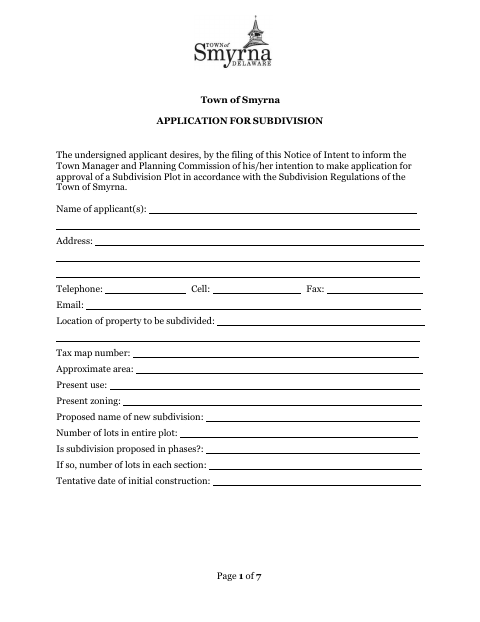
What this form is
The form is Part 1 of Smyrna’s subdivision application and informs the Town Manager and Planning Commission of an intent to seek subdivision approval. Applicants provide property and project details, then submit the required plans, fees, and supporting materials described in the application. The form also includes owner consent and applicant certification sections; the applicant declares the information true and correct before a notary.
Who needs it
Property owners or their representatives seeking Town of Smyrna approval to subdivide land must complete this notice of intent and provide the required supporting materials.
Why it needs a notary
The applicant’s truth-and-correctness declaration has a sworn-and-subscribed-before-me jurat; the individual applicant or corporate officer signs before the notary.
How to get this notarized
- 1
Download the Application
Download Smyrna’s Application for Subdivision and review the application and subdivision process instructions.
- 2
Complete the Form
Enter the applicant, owner, property, subdivision, and corporate details that apply; arrange the owner’s countersignature if needed.
- 3
Book an Online Notary
Schedule a remote notarization with a commissioned online notary for the applicant’s sworn declaration.
- 4
Sign on Video
Sign the declaration during the video appointment and complete the jurat with the notary.
- 5
Submit to the Town
Submit the signed application with the fee, plans, and supporting materials required by the Town of Smyrna.
Preview the form
The blank PDF straight from Smyrna. Look it over, then upload your filled copy to start the notary session.

You’ll need ID and a webcam.
A licensed online notary will join you on video, verify your government-issued ID, witness your signature, and apply their seal. You’ll receive the notarized PDF by email when the session ends.
Frequently asked questions
- How do I notarize the subdivision application online?
- Complete the application, then meet with a commissioned online notary by video and sign the sworn declaration during the notarization. Submit the completed application and required materials to the Town.
- Do I need to sign the application in front of a notary?
- Yes. The form includes an applicant declaration that the information is true and correct, followed by a jurat stating it was sworn and subscribed before a notary public.
- Who completes and files this subdivision application?
- The applicant provides project and property information. If the applicant is not the owner, the form says the legal owner must countersign to show knowledge and consent; the application is submitted to the Town of Smyrna.
- Where is the approved subdivision plan recorded?
- The form says the Town obtains signatures and records the plan after approvals. It identifies the county Recorder of Deeds for filing and recording; confirm with the city, county, or Recorder of Deeds office if unsure.
- Can I use an online notary for this form?
- Delaware law authorizes remote notarization by a commissioned online notary under 29 Del. C. §4320. Arrange the video notarization before signing the applicant’s sworn declaration.