
Alto, GA · Banks County
Name-Based Criminal Background History Record Information Consent Form
This consent form authorizes the Alto Police Department to obtain criminal history information for an agency or company, and is completed by a person whose background is being checked.
- licensed online notary
- ~15 min average
- Notarized PDF emailed
What you’ll need
- Government-issued photo ID
- Webcam-enabled device (laptop or phone)
- This form, ready to upload as a PDF
What this form is
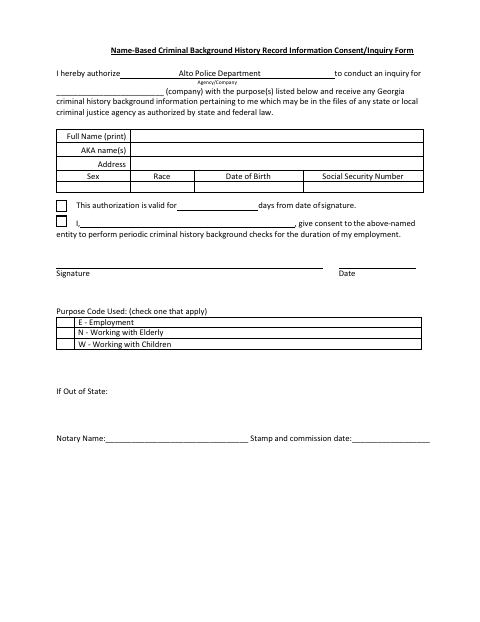
The form lets an individual authorize the Alto Police Department to obtain Georgia criminal history information for a named agency or company, for a selected purpose such as employment or work with elderly people or children. It also allows consent to periodic checks during employment and states that authorization is valid for a specified number of days from signing. The form includes extra notary details for out-of-state applicants.
Who needs it
A person asked to authorize the Alto Police Department to conduct a criminal history inquiry for an agency or company completes this form.
Why it needs a notary
The form has no stated jurat or acknowledgment wording; out-of-state applicants have fields for a notary name, stamp, and commission date alongside their consent signature.
How to get this notarized
- 1
Download The Form
Get the Name-Based Criminal Background History Record Information Consent/Inquiry Form from the Alto Police Department.
- 2
Fill In Your Details
Complete the requested personal and agency or company information, choose a purpose code, and review the consent period.
- 3
Book An Online Notary
If you are an out-of-state applicant and need notarization, arrange an appointment with a commissioned online notary.
- 4
Sign On Video
Follow the notary's instructions for signing and completing the form's out-of-state notary details.
- 5
Submit To The Police Department
Send the completed form to the Alto Police Department or the requesting agency as instructed.
Preview the form
The blank PDF straight from Alto. Look it over, then upload your filled copy to start the notary session.

You’ll need ID and a webcam.
A licensed online notary will join you on video, verify your government-issued ID, witness your signature, and apply their seal. You’ll receive the notarized PDF by email when the session ends.
Frequently asked questions
- How do I complete this background consent form?
- Print your full name and provide the requested details, select a purpose code, then sign and date the consent. The form also asks for an agency or company.
- Do I need notarization for this form?
- The form provides notary name, stamp, and commission date fields for out-of-state applicants. It does not state that every applicant must have the form notarized; confirm with the city if unsure.
- Can I use a commissioned online notary?
- Georgia has no remote online notarization statute of its own. Georgia law recognizes acknowledgments taken by notaries of other states (O.C.G.A. §44-2-21); ask the receiving office whether it accepts your notarized form.
- What purposes can I select?
- The form lists E for Employment, N for Working with Elderly, and W for Working with Children. It also includes consent for periodic checks during employment.