
Acworth, GA · Cobb County
In-Home Occupational Tax Application
This application is for people seeking an Acworth occupational tax certificate to operate a business from their home, including owners who must submit supporting documents and sworn affidavits.
- licensed online notary
- ~15 min average
- Notarized PDF emailed
What you’ll need
- Government-issued photo ID
- Webcam-enabled device (laptop or phone)
- This form, ready to upload as a PDF
What this form is
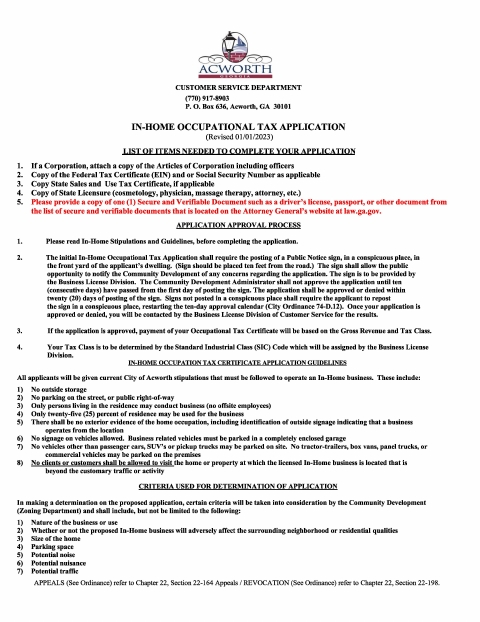
Use this application to request approval to operate an in-home business in Acworth and register for the city occupational tax. It asks about the business, services, products, employees, property use, and estimated gross receipts, and includes affidavits verifying application information and applicant status, plus a private employer affidavit when applicable. The city describes a public notice and review process; payment is due after approval, not with the application.
Who needs it
A business owner seeking an Acworth occupational tax certificate for a home-based business should complete this application and provide the supporting materials that apply.
Why it needs a notary
The form includes jurats for the application veracity, public benefit status, and private employer affidavits; the applicant or authorized employer representative signs the applicable affidavit before a notary.
How to get this notarized
- 1
Download The Application
Get the In-Home Occupational Tax Application and read the included stipulations and guidelines.
- 2
Complete The Form
Fill in the business, property, service, product, employee, and gross receipts information, and gather applicable supporting documents.
- 3
Book An Online Notary
Schedule a session with a commissioned online notary for the affidavit or affidavits that apply to your application.
- 4
Sign On Video
Sign each applicable affidavit during the online notarization session, following the notary's instructions.
- 5
Submit To The City
Submit the completed application and supporting items to the City of Acworth as directed; pay only after approval.
Preview the form
The blank PDF straight from Acworth. Look it over, then upload your filled copy to start the notary session.

You’ll need ID and a webcam.
A licensed online notary will join you on video, verify your government-issued ID, witness your signature, and apply their seal. You’ll receive the notarized PDF by email when the session ends.
Frequently asked questions
- Which parts of the application need notarization?
- The application includes jurats for the veracity affidavit and public benefit status affidavit, plus a private employer affidavit for applicable employers. Sign each applicable affidavit before the notary.
- How do I apply for an Acworth in-home occupational tax certificate?
- Read the in-home stipulations, complete the application and applicable affidavits, and gather the listed supporting documents. The city says initial applications require a public notice sign and review before a decision.
- Do I need to send payment with this application?
- No. The form says not to send payment with the application and that payment is due after approval from all departments.
- Can I use an online notary for the affidavits?
- Georgia has no remote online notarization statute of its own; Georgia law recognizes acknowledgments taken by notaries of other states under O.C.G.A. §44-2-21. Rush Notary can connect you with a commissioned online notary; confirm with the city if unsure.
Other forms in Acworth
Alcohol Manager Permit Application
Acworth
Charitable Solicitations and Peddlers Permit Application
Acworth
Affidavit for Additional Kitchen in Single-Family Dwelling
Acworth
Alcoholic Beverage License Application
Acworth
Alcoholic Beverage Catering Off-Premises Application and Event Permit
Acworth
Catering Out-of-City-Limits Permit Application
Acworth