
Powder Springs, GA · Cobb County
Employee Photo Permit Affidavit
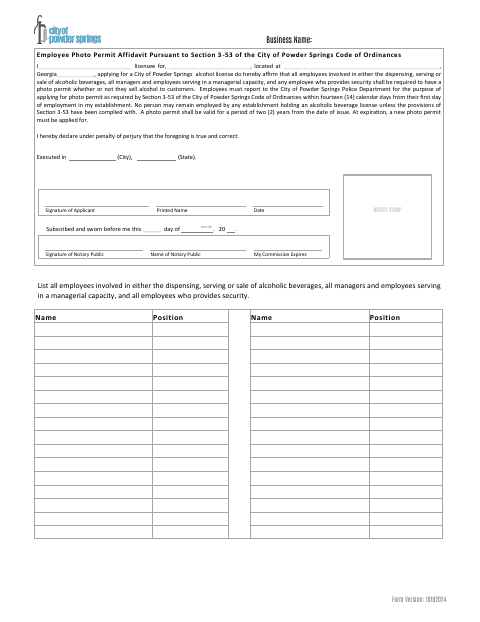
This affidavit is completed by an applicant for a City of Powder Springs alcohol license to affirm that covered employees, managers, and security staff must obtain employee photo permits.
- licensed online notary
- ~15 min average
- Notarized PDF emailed
What you’ll need
- Government-issued photo ID
- Webcam-enabled device (laptop or phone)
- This form, ready to upload as a PDF
What this form is
The affidavit states that employees involved in dispensing, serving, or selling alcoholic beverages, managerial employees, and security employees must obtain photo permits. The alcohol license applicant affirms this requirement, including that employees must apply through the Powder Springs Police Department within 14 calendar days of starting work; the form also provides a list for covered employees and their positions.
Who needs it
A person applying for a City of Powder Springs alcohol license completes this affidavit and lists the covered employees and their positions.
How to get this notarized
- 1
Download The Affidavit
Get the Employee Photo Permit Affidavit from the City of Powder Springs.
- 2
Fill In The Form
Enter the licensee and business details, then list covered employees and their positions.
- 3
Book An Online Notary
Arrange an online appointment with a commissioned online notary for the sworn affidavit.
- 4
Sign On Video
Sign and swear to the affidavit during the online notary session.
- 5
Submit To The City
Submit the completed affidavit with your City of Powder Springs alcohol license application.
Preview the form
The blank PDF straight from Powder Springs. Look it over, then upload your filled copy to start the notary session.

You’ll need ID and a webcam.
A licensed online notary will join you on video, verify your government-issued ID, witness your signature, and apply their seal. You’ll receive the notarized PDF by email when the session ends.
Frequently asked questions
- How do I complete the Employee Photo Permit Affidavit?
- Enter the licensee, business, and location details, list covered employees and positions, then sign and swear to the affidavit before a notary. Submit it with your alcohol license application.
- Do I need to sign this affidavit in front of a notary?
- Yes. The form has a subscribed-and-sworn section for the applicant, with spaces for the notary’s signature, name, commission expiration, and stamp.
- Can I use a commissioned online notary for this form?
- Georgia has no remote online notarization statute of its own, but Georgia law recognizes acknowledgments taken by notaries of other states. This form requires a sworn jurat, so confirm with the city if unsure whether it will accept an online notarization.
- Which employees must be listed?
- List employees involved in dispensing, serving, or selling alcoholic beverages, employees serving in a managerial capacity, and employees who provide security.