
Dawsonville, GA · Dawson County
Alcoholic Beverage License Application
This application lets individuals and businesses apply to the City of Dawsonville for a new or renewed alcoholic beverage license, with the required business, ownership, and sworn applicant information.
- licensed online notary
- ~15 min average
- Notarized PDF emailed
What you’ll need
- Government-issued photo ID
- Webcam-enabled device (laptop or phone)
- This form, ready to upload as a PDF
What this form is
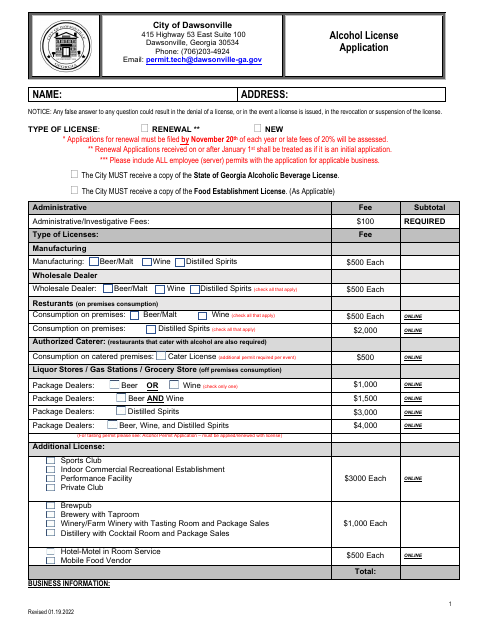
The 11-page application collects information about the business, ownership, license type, and applicant qualifications. It includes an applicant oath, a Registered Agent Consent Form when applicable, and affidavits for public-benefit status and private-employer verification. The city says renewal applications are due by November 20 each year to avoid a late fee; applications received on or after January 1 are treated as initial applications.
Who needs it
Individuals and businesses seeking a new or renewed City of Dawsonville alcoholic beverage license must complete the sections that apply to their ownership and business type.
How to get this notarized
- 1
Download the Application
Get the alcoholic beverage license application and review the city’s instructions and supporting-document requirements.
- 2
- 3
Book an Online Notary
Schedule a session with a commissioned online notary for the pages requiring sworn signatures.
- 4
Sign on Video
Show your identification and sign each applicable notarial block during the live video session.
- 5
Submit to the City
Include the notarized pages and required supporting documents when submitting your application to the City of Dawsonville.
Preview the form
The blank PDF straight from Dawsonville. Look it over, then upload your filled copy to start the notary session.

You’ll need ID and a webcam.
A licensed online notary will join you on video, verify your government-issued ID, witness your signature, and apply their seal. You’ll receive the notarized PDF by email when the session ends.
Frequently asked questions
- How do I get this application notarized online?
- Complete the application, then book with a commissioned online notary. Sign the oath and any applicable sworn affidavit during the video session, and follow the city’s instructions for submitting the application.
- Do I need to notarize every page?
- The application includes a notary block for the applicant’s oath on page 7, plus sworn blocks for the Registered Agent Consent Form and affidavits. Sign the blocks that apply to your application.
- Can I use a commissioned online notary for this form?
- Georgia has no remote online notarization statute of its own. Georgia law recognizes acknowledgments taken by notaries of other states under O.C.G.A. §44-2-21; confirm with the city if unsure about these sworn forms.
- What should I prepare before my appointment?
- Complete the applicable business and ownership sections and gather the supporting items the form requests, such as identification copies and license documents. Do not sign the sworn blocks until directed during notarization.
Alcoholic Beverage License Application in other Georgia cities
Each city publishes its own version of this form. Pick the city where you’re filing.