
Douglasville, GA · Douglas County
Contractor Release of Permit
This form lets a primary permit holder request removal from a construction permit after the contractual arrangement with the property owner has ended, for submission to the City of Douglasville.
- licensed online notary
- ~15 min average
- Notarized PDF emailed
What you’ll need
- Government-issued photo ID
- Webcam-enabled device (laptop or phone)
- This form, ready to upload as a PDF
What this form is
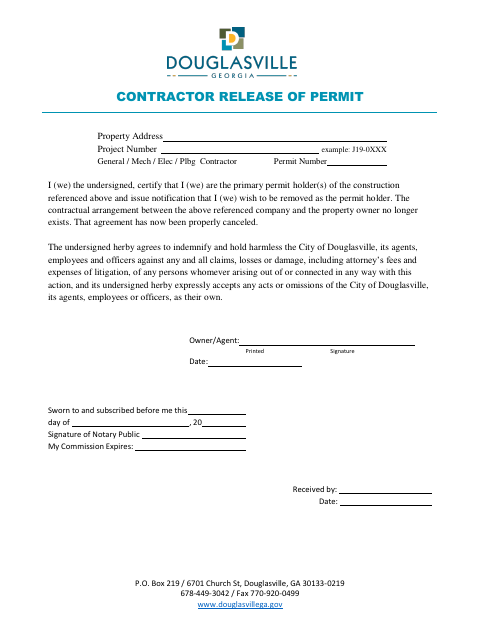
The Contractor Release of Permit identifies the property, project, permit, and contractor, and records the primary permit holder’s request to be removed. The signer certifies that the contractual arrangement with the property owner has ended and agrees to indemnify and hold harmless the City of Douglasville and its representatives. The form includes a notary section and a space for the city to record receipt.
Who needs it
A primary permit holder seeking removal from a construction permit after the contractual arrangement with the property owner has been canceled needs this form.
Why it needs a notary
The form carries a “Sworn to and subscribed before me” jurat; the Owner/Agent signs before the notary, who signs and records the commission expiration.
How to get this notarized
- 1
Download the Form
Get the Contractor Release of Permit form from the City of Douglasville.
- 2
Fill In the Form
Provide the property address, project number, contractor permit information, and Owner/Agent details.
- 3
Book an Online Notary
Arrange an online notarization and check with the city if you are unsure whether it accepts this form notarized online.
- 4
Sign on Video
Sign as Owner/Agent before the notary during the online session.
- 5
Submit to the City
Send the completed form to the City of Douglasville and follow its submission instructions.
Preview the form
The blank PDF straight from Douglasville. Look it over, then upload your filled copy to start the notary session.

You’ll need ID and a webcam.
A licensed online notary will join you on video, verify your government-issued ID, witness your signature, and apply their seal. You’ll receive the notarized PDF by email when the session ends.
Frequently asked questions
- How do I complete the Contractor Release of Permit?
- Enter the property address, project number, and contractor permit details. The Owner/Agent signs before a notary, then submits the completed form to the City of Douglasville.
- Do I need to sign this form before a notary?
- Yes. The form includes a “Sworn to and subscribed before me” section, where the Owner/Agent signs before the notary.
- Can I use a commissioned online notary for this form?
- Georgia has no remote online notarization statute of its own and recognizes acknowledgments taken by notaries of other states (O.C.G.A. §44-2-21). This form uses a sworn jurat, so confirm with the city if unsure whether it will accept online notarization.
- Where do I submit the completed form?
- The form is addressed to the City of Douglasville. Contact the city for submission instructions or questions about its receipt process.
Other forms in Douglasville
Alcohol License Change in Agent/Outlet Manager Application
Douglasville
Authorized Contractor's Agent Form
Douglasville
Authorized Owner's Agent Form
Douglasville
Home Owner Self-Contractor Unlicensed Affidavit
Douglasville
Occupational Tax / Business License Application
Douglasville
Owner Release of Permit Contractor(s)
Douglasville