
Johns Creek, GA · Fulton County
Car Rental Excise Tax Return
Rental motor vehicle businesses use this return to report monthly rental charges and calculate the excise tax due to the City of Johns Creek.
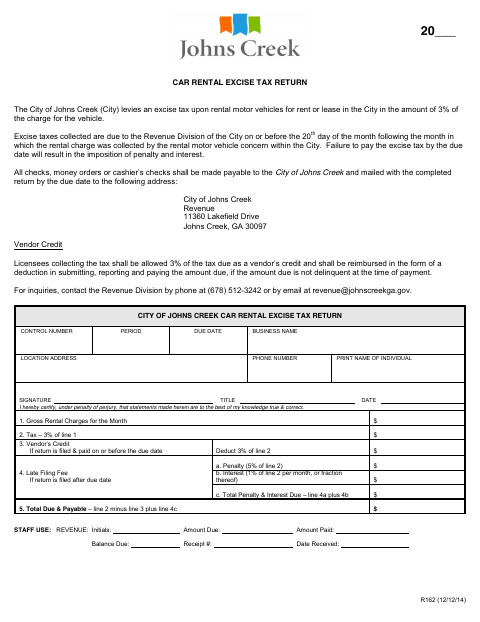
What this form is
The return reports gross rental charges for the month and calculates the 3% excise tax, any vendor credit, and any late penalty or interest. The city says collected taxes are due to its Revenue Division by the 20th day of the following month. The form asks for business and contact details, tax calculations, and a signed certification that the statements are true and correct.
Who needs it
A rental motor vehicle business collecting excise tax on vehicles rented or leased in Johns Creek uses this return to report and pay the tax.
How to submit it
Mail the completed return with payment by the due date to City of Johns Creek Revenue, 11360 Lakefield Drive, Johns Creek, GA 30097. Checks, money orders, and cashier’s checks must be payable to the City of Johns Creek.
About notarization
This document is signed without a notary; the signer certifies under penalty of perjury and signs and dates the return.
How to submit this form
- 1
Download The Return
Download the Car Rental Excise Tax Return.
- 2
Complete The Return
Enter the business and contact details, monthly gross rental charges, tax calculations, and signer information.
- 3
Prepare Payment
Include payment by check, money order, or cashier’s check payable to the City of Johns Creek.
- 4
Mail To The City
Mail the completed return and payment by the due date to City of Johns Creek Revenue, 11360 Lakefield Drive, Johns Creek, GA 30097.
Frequently asked questions
- What does the Car Rental Excise Tax Return report?
- It reports monthly gross rental charges and calculates the 3% excise tax, any eligible vendor credit, and any late penalty or interest.
- Do I need a notary for the Car Rental Excise Tax Return?
- No. The signer certifies the statements under penalty of perjury and signs and dates the return; no notary block is included.
- How do I submit the Car Rental Excise Tax Return?
- Mail the completed return and payment by the due date to City of Johns Creek Revenue, 11360 Lakefield Drive, Johns Creek, GA 30097.
Need something notarized?
This Car Rental Excise Tax Return doesn’t need a notary — but if you have another Johns Creek form that does, a commissioned online notary can help.