
Johns Creek, GA · Fulton County
Permit Calculation Form
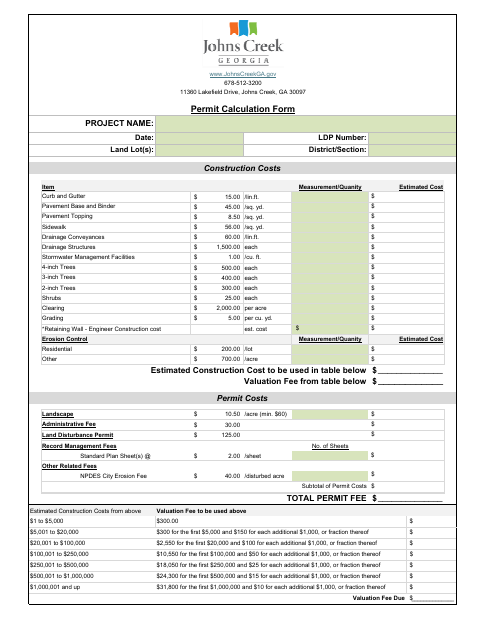
This form records project details, estimated construction costs, and permit fee calculations for a land disturbance permit project in Johns Creek.
What this form is
The Permit Calculation Form records a project name, date, land lots, LDP number, district or section, measurements, quantities, and estimated costs. It includes calculations for land disturbance, erosion control, and other permit costs, with fee tables based on valuation and project costs. Use it to calculate the permit fees shown on the form for a Johns Creek project.
Who needs it
People preparing a land disturbance permit project in Johns Creek can use this form to enter project information and calculate permit costs.
How to submit it
Submit it to the city department named on the form; check the city website for current contact details.
About notarization
This document is signed without a notary; the signer just signs and dates it.
How to submit this form
- 1
Download The Form
Download the Johns Creek Permit Calculation Form PDF.
- 2
Complete Project Details
Enter the project name, date, land lots, LDP number, district or section, measurements, quantities, and estimated costs.
- 3
Calculate Permit Costs
Use the fee tables on the form to calculate the applicable permit costs and total permit fee.
- 4
Submit To The City
Submit the completed form to the city department named on the form; check the city website for current contact details.
Frequently asked questions
- What is the Johns Creek Permit Calculation Form for?
- It records project information, measurements, estimated construction costs, and permit fee calculations, including land disturbance and erosion control costs.
- What information does the form ask for?
- The form includes spaces for the project name, date, land lots, LDP number, district or section, measurements, quantities, estimated costs, and permit fees.
- Do I need a notary for the Permit Calculation Form?
- No. This document is signed without a notary; the signer just signs and dates it.
- How do I submit the Permit Calculation Form?
- Submit it to the city department named on the form; check the city website for current contact details.
Need something notarized?
This Permit Calculation Form doesn’t need a notary — but if you have another Johns Creek form that does, a commissioned online notary can help.