
Johns Creek, GA · Fulton County
Solicitors Permit Application
Door-to-door solicitors complete this application to request a Johns Creek permit, providing personal, address, vehicle, employer, solicitation, background-consent, and lawful-presence information.
- licensed online notary
- ~15 min average
- Notarized PDF emailed
What you’ll need
- Government-issued photo ID
- Webcam-enabled device (laptop or phone)
- This form, ready to upload as a PDF
What this form is
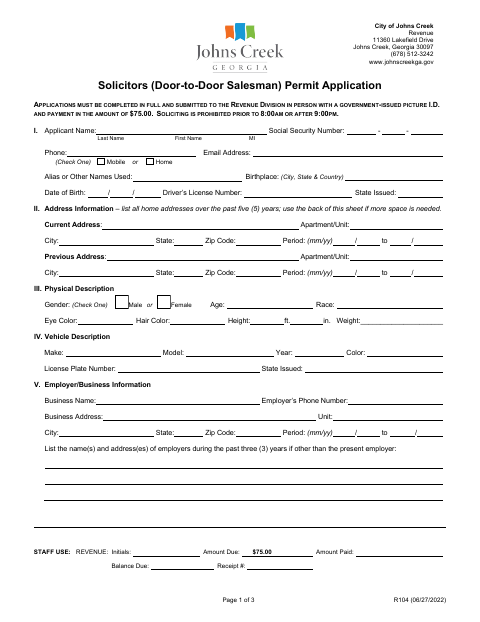
The application collects the solicitor’s identifying and contact details, address and employment history, physical and vehicle descriptions, prior solicitation locations, and proposed solicitation activity. It also includes background-investigation consent and an affidavit about lawful presence in the United States. The form says applicants must complete it in full and submit it in person to the Revenue Division with government-issued photo ID and the $75 payment.
Who needs it
Anyone applying to solicit door to door in Johns Creek must complete this application and submit it with the required photo ID and $75 payment.
Why it needs a notary
The lawful-presence affidavit has a subscribed-and-sworn jurat; the applicant signs and swears or affirms the statement before the clerk or notary public.
How to get this notarized
- 1
Download The Application
Get the Solicitors Permit Application and review all three pages, including the lawful-presence affidavit.
- 2
Fill Out The Form
Complete the application fields and select the applicable lawful-presence and public-benefit options.
- 3
Book An Online Notary
Arrange a video session with a commissioned online notary for the sworn affidavit.
- 4
Sign On Video
Sign and swear or affirm the lawful-presence statement before the notary during the session.
- 5
Submit To The City
Submit the completed application in person to the Revenue Division with government-issued photo ID and the $75 payment.
Preview the form
The blank PDF straight from Johns Creek. Look it over, then upload your filled copy to start the notary session.

You’ll need ID and a webcam.
A licensed online notary will join you on video, verify your government-issued ID, witness your signature, and apply their seal. You’ll receive the notarized PDF by email when the session ends.
Frequently asked questions
- How do I complete the notarized part of this solicitor permit application?
- Complete the application, then sign and swear or affirm the lawful-presence affidavit before a commissioned online notary. The form also requires in-person submission to the city.
- Do I need to notarize the entire application?
- The form’s notary block follows the lawful-presence affidavit and calls for the applicant to subscribe and swear before a clerk or notary public. The other application sections do not show a notary block.
- Can I submit the application online after notarizing?
- The form says applications must be submitted in person to the Revenue Division with government-issued photo ID and $75 payment. Confirm with the city if unsure about submission details.
- Can an online notary notarize the affidavit?
- Georgia has no remote online notarization statute of its own. Georgia law recognizes acknowledgments taken by notaries of other states under O.C.G.A. §44-2-21; confirm with the city whether it accepts this sworn affidavit notarized remotely.
Other forms in Johns Creek
Solicitors Permit Application in other Georgia cities
Each city publishes its own version of this form. Pick the city where you’re filing.