
South Fulton, GA · Fulton County
Temporary Power Connection to Service Utilities Affidavit
The Temporary Power Connection to Service Utilities Affidavit requests temporary electrical service approval and is completed by the electrical contractor for a property seeking temporary power before permanent approval.
- licensed online notary
- ~15 min average
- Notarized PDF emailed
What you’ll need
- Government-issued photo ID
- Webcam-enabled device (laptop or phone)
- This form, ready to upload as a PDF
What this form is
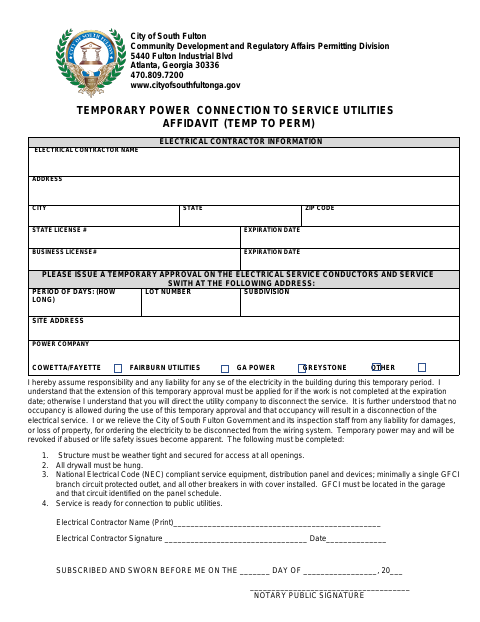
The affidavit asks the City of South Fulton Permitting Division to issue temporary approval for electrical service conductors and a service switch at a listed site address. The electrical contractor provides license and business details, the requested approval period, lot and subdivision information, and utility company, then accepts responsibility for electricity use and acknowledges restrictions, including no occupancy. The form also lists structure and electrical-system conditions for temporary service.
Who needs it
An electrical contractor seeking temporary approval for utility power at a listed property completes and signs this affidavit, providing contractor, site, and service details.
How to get this notarized
- 1
Download The Affidavit
Get the Temporary Power Connection to Service Utilities Affidavit from the City of South Fulton.
- 2
Fill In The Form
Enter the contractor, license, property, requested approval period, and utility company details.
- 3
- 4
Sign On Video
Sign and swear to the affidavit before the notary during the online video session.
- 5
Submit It To The City
Submit the completed affidavit to the City of South Fulton Permitting Division.
Preview the form
The blank PDF straight from South Fulton. Look it over, then upload your filled copy to start the notary session.

You’ll need ID and a webcam.
A licensed online notary will join you on video, verify your government-issued ID, witness your signature, and apply their seal. You’ll receive the notarized PDF by email when the session ends.
Frequently asked questions
- How do I get the temporary power affidavit notarized?
- Complete the contractor and property details, book a session with a commissioned online notary, and sign and swear to the affidavit during the video session. Submit it to the city.
- Do I need to sign this affidavit before a notary?
- Yes. The form includes a “subscribed and sworn before me” jurat, so the electrical contractor signs and swears to the affidavit before a notary.
- Can I use an online notary for this affidavit in Georgia?
- Georgia has no remote online notarization statute of its own. Georgia law recognizes acknowledgments taken by notaries of other states under O.C.G.A. §44-2-21; ask the city whether it accepts this remotely notarized sworn affidavit.
- What conditions does the form list for temporary power?
- The form lists a weather-tight, secured structure; drywall hung; NEC-compliant service equipment and devices, including a GFCI outlet; and service ready for connection to public utilities.
- Who should I contact if I am unsure whether the city will accept it?
- Contact the City of South Fulton Permitting Division about acceptance and submission requirements; confirm with the city if unsure.
Other forms in South Fulton
Alcohol Beverage License Application (Consumption on Premises)
South Fulton
Alcohol Beverage License Application (Retail)
South Fulton
E-Verify Affidavit – Private Employer
South Fulton
Registered Agent Designee Form
South Fulton
SAVE Affidavit Verifying Status for City Public Benefit
South Fulton
Abandoned and Vacant Building Certificate Application
South Fulton