
Lawrenceville, GA · Gwinnett County
Change-In-Conditions Application
This application requests a change to property conditions or zoning and is filed by an applicant seeking city review of a proposed change in Lawrenceville.
- licensed online notary
- ~15 min average
- Notarized PDF emailed
What you’ll need
- Government-issued photo ID
- Webcam-enabled device (laptop or phone)
- This form, ready to upload as a PDF
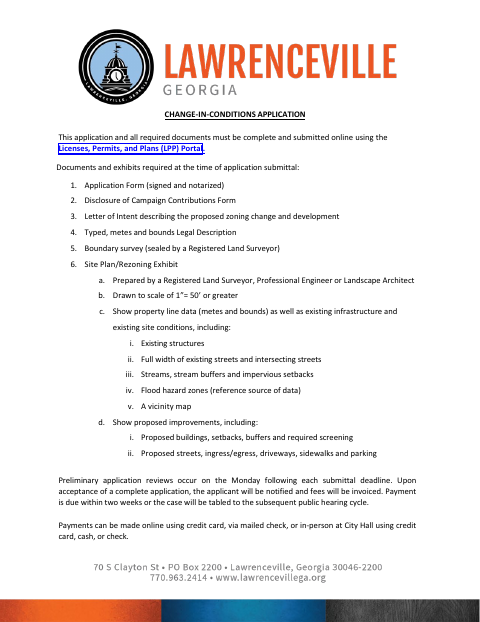
What this form is
Use this application to request a change in conditions for property in Lawrenceville. The city requires a signed and notarized application, along with supporting items such as a letter of intent, legal description, boundary survey, site plan, and campaign-contributions disclosure, submitted through its online portal. After a complete application is accepted, the applicant is notified and invoiced; the applicant must also attend the specified Planning Commission and City Council meetings.
Who needs it
An applicant requesting a change in conditions for Lawrenceville property must submit this application and the required supporting documents through the city’s LPP Portal.
Why it needs a notary
The application has Notary Public signature and date lines for the applicant and property owner, who must sign the application before a notary.
How to get this notarized
- 1
Download The Application
Get the Change-In-Conditions Application and review its required documents and exhibits.
- 2
Complete The Form
Fill in applicant, property owner, zoning, parcel, and property details, and prepare the required supporting materials.
- 3
Book An Online Notary
Schedule a session with a commissioned online notary for the application signatures.
- 4
Sign On Video
Sign the application during the online notary session and complete the notarization.
- 5
Submit To The City
Submit the complete application and required documents online through the city’s LPP Portal.
Preview the form
The blank PDF straight from Lawrenceville. Look it over, then upload your filled copy to start the notary session.

You’ll need ID and a webcam.
A licensed online notary will join you on video, verify your government-issued ID, witness your signature, and apply their seal. You’ll receive the notarized PDF by email when the session ends.
Frequently asked questions
- How do I submit a Change-In-Conditions Application?
- Complete and notarize the application, assemble the required documents and exhibits, then submit the complete package online through the city’s Licenses, Permits, and Plans Portal.
- Do I need to attend meetings after filing?
- Yes. The form says the applicant is required to appear at the Planning Commission Meeting, City Council Work Session, and City Council Public Hearing.
- Can I sign this application with a commissioned online notary?
- Georgia has no remote online notarization statute of its own. Georgia law recognizes acknowledgments taken by notaries of other states (O.C.G.A. §44-2-21). A commissioned online notary may be an option; confirm with the city if unsure.
- Who signs before the notary?
- The form includes separate Notary Public signature and date lines for the applicant and property owner. The application instructions say the application must be signed and notarized.
Other forms in Lawrenceville
Commercial Business License Citizenship Affidavit
Lawrenceville
E-Verify Affidavit (10 or More Employees)
Lawrenceville
E-Verify Affidavit (Fewer than 10 Employees)
Lawrenceville
Homeowner Contractor Exemption Affidavit
Lawrenceville
S.A.V.E. Citizenship Affidavit
Lawrenceville
Administrative Variance Consent
Lawrenceville
Change-In-Conditions Application in other Gwinnett County cities
Each city publishes its own version of this form. Pick the city where you’re filing.