
Lawrenceville, GA · Gwinnett County
Multi-Family Rental Housing Code Compliance Certificate
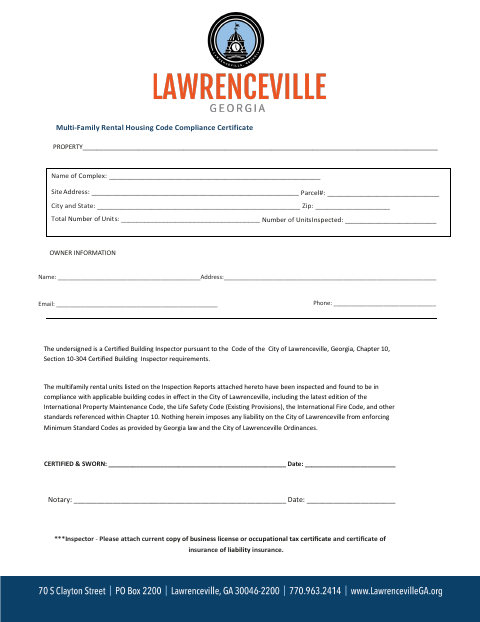
This certificate documents inspections and code compliance for multi-family rental units and is completed by a certified building inspector for a property seeking an Occupation Tax Certificate.
- licensed online notary
- ~15 min average
- Notarized PDF emailed
What you’ll need
- Government-issued photo ID
- Webcam-enabled device (laptop or phone)
- This form, ready to upload as a PDF
What this form is
Lawrenceville uses this certificate to review whether multi-family rental units meet applicable building, property maintenance, life safety, and fire codes. Businesses receiving income from four or more rental units must provide inspection and certification information as a prerequisite to obtaining an Occupation Tax Certificate. The form tracks inspections over a three-year period; qualifying new multi-family units are exempt for five years after the City issues a Certificate of Occupancy.
Who needs it
A certified building inspector completes the inspection certification for a multi-family rental property seeking an Occupation Tax Certificate in Lawrenceville.
Why it needs a notary
The inspector signs the “CERTIFIED & SWORN” certification before the notary, who completes the notary line and dates the attestation.
How to get this notarized
- 1
Download The Certificate
Get the Multi-Family Rental Housing Code Compliance Certificate and review its property, owner, inspection, and unit standards sections.
- 2
Complete The Form
Fill in the applicable property and inspection details, and include the required supporting business license or occupational tax certificate and proof of liability insurance.
- 3
Book An Online Notary
Arrange an online notarization for the inspector who must sign the “CERTIFIED & SWORN” certification.
- 4
Sign On Video
The inspector signs the certification during the video session and completes the notary process.
- 5
Submit To The City
Submit the completed certificate and required attachments to the City of Lawrenceville for review.
Preview the form
The blank PDF straight from Lawrenceville. Look it over, then upload your filled copy to start the notary session.

You’ll need ID and a webcam.
A licensed online notary will join you on video, verify your government-issued ID, witness your signature, and apply their seal. You’ll receive the notarized PDF by email when the session ends.
Frequently asked questions
- Who completes the compliance certificate?
- A certified building inspector completes the inspection information and signs the “CERTIFIED & SWORN” certification. The form also includes property, owner, and inspection details.
- Do I need to have the inspector’s signature notarized?
- The certificate includes a “CERTIFIED & SWORN” line and a separate notary line. The inspector signs the certification before the notary completes the attestation.
- How do I submit the certificate for an Occupation Tax Certificate?
- Complete the relevant property and inspection sections, have the inspector sign and complete the notary process, attach the requested business license or occupational tax certificate and insurance certificate, then submit it to the City.
- Can I use an online notary for this sworn certificate?
- Georgia has no remote online notarization statute of its own. Georgia law recognizes acknowledgments taken by notaries of other states, but this form calls for a sworn certification; confirm with the city if unsure.
Other forms in Lawrenceville
Commercial Business License Citizenship Affidavit
Lawrenceville
E-Verify Affidavit (10 or More Employees)
Lawrenceville
E-Verify Affidavit (Fewer than 10 Employees)
Lawrenceville
Homeowner Contractor Exemption Affidavit
Lawrenceville
S.A.V.E. Citizenship Affidavit
Lawrenceville
Administrative Variance Consent
Lawrenceville