
Hampton, GA · Henry County
Affidavit in Support of Application for License to Sell Alcoholic Beverages
This sworn affidavit supports a City of Hampton application for an alcoholic-beverage license and is completed by the applicant or an authorized person familiar with the application.
- licensed online notary
- ~15 min average
- Notarized PDF emailed
What you’ll need
- Government-issued photo ID
- Webcam-enabled device (laptop or phone)
- This form, ready to upload as a PDF
What this form is
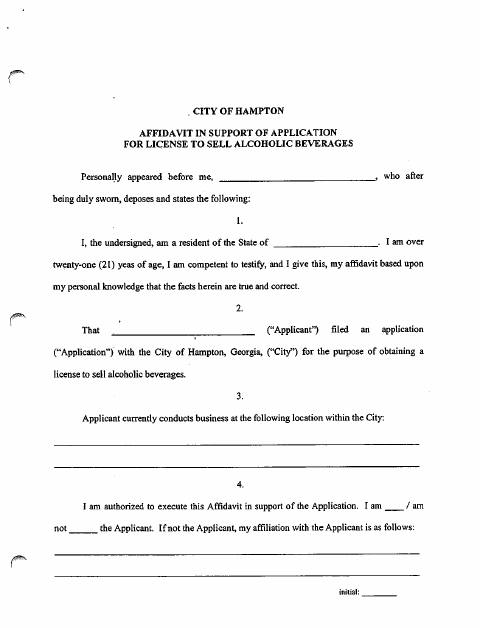
The affidavit supports an application to sell alcoholic beverages in the City of Hampton. The signer confirms details about the applicant and business location, attests to reviewing the application, and makes statements about license requirements and the accuracy of the information. The form says applicants and designated individuals must complete an application and affidavit annually, and changes requiring different answers must be reported to the City in writing within ten days.
Who needs it
An applicant for a City of Hampton alcoholic-beverage license, or a person authorized to support the application, completes this affidavit each year.
How to get this notarized
- 1
Download the Affidavit
Get the City of Hampton affidavit supporting an application to sell alcoholic beverages.
- 2
Complete the Form
Enter the requested information and review the affidavit against the license application. Do not sign it yet.
- 3
Book an Online Notary
Arrange a session with a commissioned online notary and check with the City if you are unsure it accepts online notarization.
- 4
Sign on Video
Appear for the online session, swear to the affidavit’s statements, and sign as directed by the notary.
- 5
Submit to the City
Submit the completed affidavit with the corresponding application to the City of Hampton.
Preview the form
The blank PDF straight from Hampton. Look it over, then upload your filled copy to start the notary session.

You’ll need ID and a webcam.
A licensed online notary will join you on video, verify your government-issued ID, witness your signature, and apply their seal. You’ll receive the notarized PDF by email when the session ends.
Frequently asked questions
- How do I complete the affidavit?
- Fill in the affidavit and review it alongside the license application. Leave the signature for the notary appointment, swear to the statements, sign before the notary, and submit the completed documents to the City.
- Do I need to sign this affidavit in front of a notary?
- Yes. The form includes a sworn statement and a notary jurat. The affiant must swear to the affidavit’s statements and sign in the notary’s presence.
- Can I use a commissioned online notary?
- Georgia has no remote online notarization statute of its own; Georgia law recognizes acknowledgments taken by notaries of other states under O.C.G.A. §44-2-21. Because this form uses a jurat, confirm with the city if unsure whether it accepts online notarization.
- Who may sign the affidavit?
- The form says the signer may be the applicant or another person authorized to execute the affidavit in support of the application. A non-applicant signer must state their affiliation with the applicant.