
Hinesville, GA · Liberty County
Background Consent Form
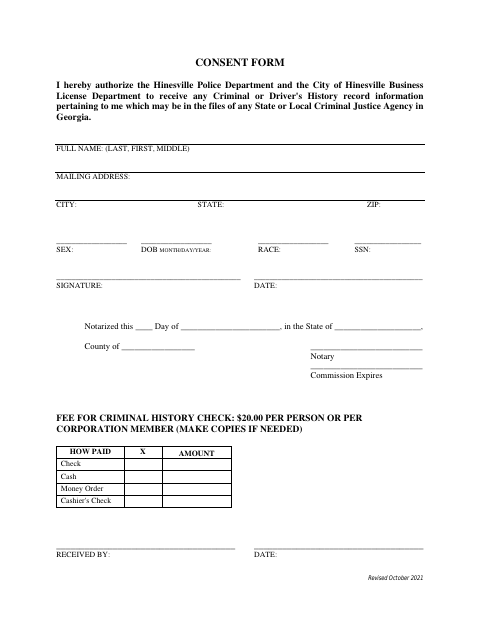
This form authorizes the Hinesville Police Department and City of Hinesville Business License Department to receive a signer’s criminal or driver history records from Georgia criminal justice agencies.
- licensed online notary
- ~15 min average
- Notarized PDF emailed
What you’ll need
- Government-issued photo ID
- Webcam-enabled device (laptop or phone)
- This form, ready to upload as a PDF
What this form is
The form gives the Hinesville Police Department and City of Hinesville Business License Department permission to receive the signer’s criminal or driver history information held by Georgia state or local criminal justice agencies. It includes personal identification fields, a signature and notarization section, and a $20 fee for each person or corporation member. Submit it when the city requests consent for a criminal history check; the form says to make copies if needed.
Who needs it
A person or corporation member asked to authorize the Hinesville Police Department and City of Hinesville Business License Department to obtain criminal or driver history information needs this form.
Why it needs a notary
The form has a notarization statement with date, state, county, notary, and commission-expiration fields; the person giving consent signs before the notary.
How to get this notarized
- 1
Download the Form
Get the Background Consent Form from the City of Hinesville.
- 2
Fill In Your Details
Enter your identifying information and review the consent before signing.
- 3
Book an Online Notary
Schedule a session with a commissioned online notary.
- 4
Sign on Video
Sign the consent during the video session as directed by the notary.
- 5
Submit to the City
Submit the notarized form and the listed fee to the appropriate city department.
Preview the form
The blank PDF straight from Hinesville. Look it over, then upload your filled copy to start the notary session.

You’ll need ID and a webcam.
A licensed online notary will join you on video, verify your government-issued ID, witness your signature, and apply their seal. You’ll receive the notarized PDF by email when the session ends.
Frequently asked questions
- How do I get the Background Consent Form notarized?
- Complete the form, then book online with a commissioned online notary. Sign during the video session as directed, and submit the notarized form to the city with any required fee.
- Do I need to sign the form in front of a notary?
- The form includes a notarization statement and spaces for the notary and commission expiration. Sign in the notary’s presence during your appointment.
- Can I use an online notary for this form in Georgia?
- Georgia has no remote online notarization statute of its own and recognizes acknowledgments taken by notaries of other states (O.C.G.A. §44-2-21). Confirm with the city if unsure whether it accepts this notarization.
- What fee does the form list for a criminal history check?
- The form lists a fee of $20 per person or per corporation member. It provides payment options including check, cash, money order, and cashier’s check.
Other forms in Hinesville
Business License Application
Hinesville
Class V Alcohol Beverage License Application (Special Events)
Hinesville
Flea Market Permit Addendum
Hinesville
Mobile Food Service Establishment License Application
Hinesville
Peddler or Transient Merchant License Application
Hinesville
SAVE Lawful Presence Affidavit
Hinesville