
Dallas, GA · Paulding County
Disclosure of Campaign Contributions and Gifts
This disclosure reports qualifying campaign contributions or gifts connected to a City of Dallas annexation application and is filed separately by each applicant, representative, and property titleholder.
- licensed online notary
- ~15 min average
- Notarized PDF emailed
What you’ll need
- Government-issued photo ID
- Webcam-enabled device (laptop or phone)
- This form, ready to upload as a PDF
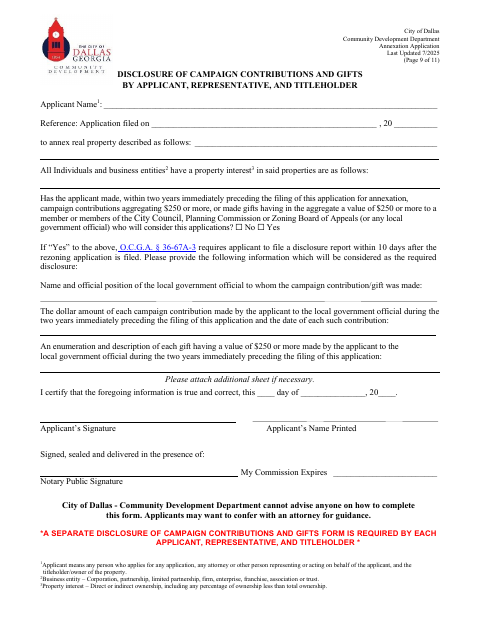
What this form is
Use this form with a City of Dallas annexation application to disclose whether the applicant made campaign contributions or gifts totaling $250 or more to officials who may consider the application during the preceding two years. If the applicant answers yes, the form requests details about the official, contributions, and gifts; it states that O.C.G.A. § 36-67A-3 requires a disclosure report within 10 days after the application is filed. Attach another sheet if needed.
Who needs it
Each applicant, representative, and property titleholder associated with a City of Dallas annexation application must submit a separate disclosure form.
Why it needs a notary
The form includes a notary signature and commission-expiration block beneath the applicant’s signature; the applicant signs and certifies the information before the notary.
How to get this notarized
- 1
Download the Form
Get the City of Dallas campaign contribution and gift disclosure form.
- 2
Complete the Disclosure
Enter the applicant and application details, answer the contribution-and-gift question, and provide requested information if applicable.
- 3
Book an Online Notary
Arrange an online notarization with a commissioned online notary and have the completed form ready.
- 4
Sign on Video
Sign the applicant certification during the online notary session.
- 5
Submit to the City
Send the notarized disclosure to the City of Dallas with the annexation application, following city instructions.
Preview the form
The blank PDF straight from Dallas. Look it over, then upload your filled copy to start the notary session.

You’ll need ID and a webcam.
A licensed online notary will join you on video, verify your government-issued ID, witness your signature, and apply their seal. You’ll receive the notarized PDF by email when the session ends.
Frequently asked questions
- Who files this campaign disclosure?
- The form requires a separate disclosure from each applicant, representative, and titleholder associated with the annexation application.
- What contributions or gifts must I disclose?
- The form asks whether, during the two years before filing, the applicant made contributions or gifts totaling $250 or more to officials who may consider the application. If yes, provide the requested details.
- Do I need to have my signature notarized?
- The form has a notary signature and commission-expiration block below the applicant’s signature. Complete the signature before a notary, and confirm with the city if unsure.
- How do I get this disclosure notarized online?
- Georgia has no remote online notarization statute of its own, but Georgia law recognizes acknowledgments taken by notaries of other states under O.C.G.A. § 44-2-21. Ask a commissioned online notary whether they can notarize this form.