
Cedartown, GA · Polk County
Utility Services Account Update
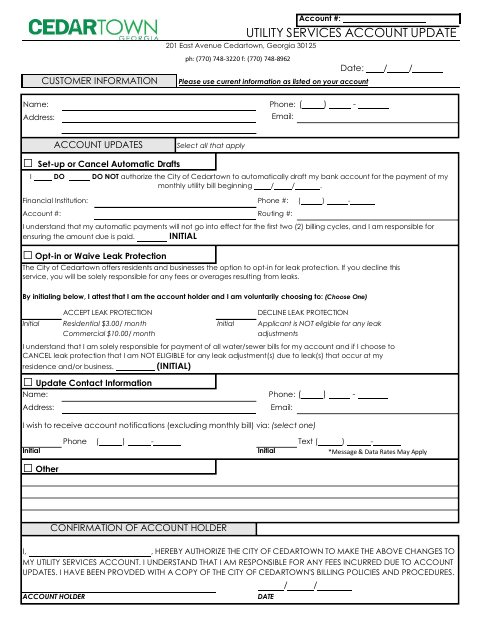
This form lets Cedartown utility account holders request updates to automatic drafts, leak protection choices, or contact information.
What this form is
Utility account holders use this form to update account preferences and contact details. It provides options to set up or cancel automatic bank drafts, accept or decline leak protection, and change contact information or notification preferences. The form asks for customer and account details, applicable selections and initials, and the account holder’s signature and date.
Who needs it
A Cedartown utility account holder who wants to change automatic drafts, leak protection preferences, contact information, or notification preferences needs this form.
How to submit it
Submit it to the city department named on the form; check the city website for current contact details.
About notarization
This document is signed and dated without a notary; the account holder initials applicable selections, and no notarized or sworn attachment is identified.
How to submit this form
- 1
Download The Form
Download the Utility Services Account Update form.
- 2
Complete Account Information
Enter customer and account details, select the updates you want, and initial applicable sections.
- 3
Sign And Date
The account holder signs and dates the confirmation of account holder section.
- 4
Submit To The City
Submit it to the city department named on the form; check the city website for current contact details.
Frequently asked questions
- What can I update with this form?
- You can set up or cancel automatic drafts, choose whether to accept or decline leak protection, update contact information, and choose how to receive account notifications.
- Who completes the Utility Services Account Update?
- The utility account holder completes the form with customer and account information, selects applicable updates, initials where indicated, and signs and dates the confirmation.
- How do I submit the Utility Services Account Update?
- Submit it to the city department named on the form; check the city website for current contact details.
- Do I need a notary for the Utility Services Account Update?
- No. The account holder signs and dates the form and initials applicable selections; the document identifies no notarized or sworn attachment.
Need something notarized?
This Utility Services Account Update doesn’t need a notary — but if you have another Cedartown form that does, a commissioned online notary can help.