
Butler, GA · Taylor County
Public Benefit Status Affidavit
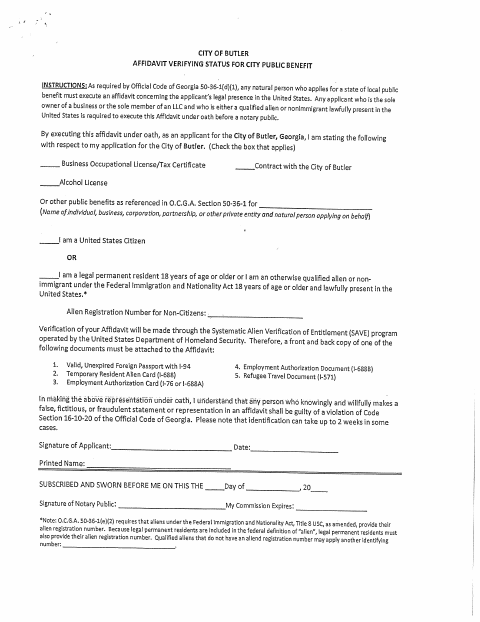
This affidavit verifies an applicant’s immigration status for a City of Butler public benefit application, including business licenses, contracts, alcohol licenses, or other listed benefits.
- licensed online notary
- ~15 min average
- Notarized PDF emailed
What you’ll need
- Government-issued photo ID
- Webcam-enabled device (laptop or phone)
- This form, ready to upload as a PDF
What this form is
The affidavit asks the applicant to identify the public benefit sought and state whether they are a United States citizen, a lawful permanent resident, or another qualified person lawfully present. The city requires it from a natural person applying for a public benefit and from a sole business owner or sole LLC member who is a qualified alien or nonimmigrant lawfully present; noncitizens must provide an alien registration number or another identifying number where applicable, and supporting document copies may be required.
Who needs it
A natural person applying for a City of Butler public benefit, including a qualifying sole business owner or sole LLC member, must complete the affidavit.
How to get this notarized
- 1
Download The Affidavit
Get the City of Butler public benefit status affidavit.
- 2
Fill Out The Form
Select the benefit, provide the applicant and status details, and gather any required document copies.
- 3
Book An Online Notary
Arrange a session with a commissioned online notary and check with the city about acceptance.
- 4
- 5
Submit To The City
Send the completed affidavit and required supporting documents to the City of Butler.
Preview the form
The blank PDF straight from Butler. Look it over, then upload your filled copy to start the notary session.

You’ll need ID and a webcam.
A licensed online notary will join you on video, verify your government-issued ID, witness your signature, and apply their seal. You’ll receive the notarized PDF by email when the session ends.
Frequently asked questions
- How do I complete the public benefit status affidavit?
- Select the benefit that applies, provide the applicant and status information, and include the requested identifying number and supporting document copies when applicable. Sign under oath before a notary.
- Do I need to attach identity documents?
- The form says verification is made through the SAVE program and requires front-and-back copies of a listed document. Check the form’s document list and confirm what applies to you.
- Can I sign this affidavit with an online notary?
- Georgia has no remote online notarization statute of its own. Georgia law recognizes acknowledgments taken by notaries of other states under O.C.G.A. §44-2-21, while this form requires an oath. Ask the city whether it accepts this notarization; confirm with the city if unsure.
- Who signs the affidavit before the notary?
- The applicant signs under oath. The form also has spaces for the notary’s signature and commission expiration date.
Public Benefit Status Affidavit in other Georgia cities
Each city publishes its own version of this form. Pick the city where you’re filing.