
Mountain Home, ID · Elmore County
Affidavit of Sign Posting
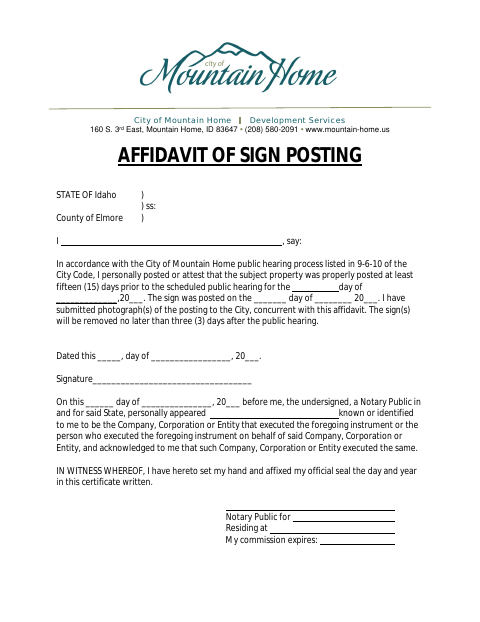
This affidavit documents that a sign was posted for a public hearing, photographs were submitted to the City, and the signer confirms the posting details for Mountain Home Development Services.
- licensed online notary
- ~15 min average
- Notarized PDF emailed
What you’ll need
- Government-issued photo ID
- Webcam-enabled device (laptop or phone)
- This form, ready to upload as a PDF
What this form is
Use this affidavit for a City of Mountain Home public hearing when the subject property must have a sign posted at least 15 days before the hearing. The signer states when the sign was posted, confirms that photographs were submitted to the City with the affidavit, and agrees the sign will be removed no later than three days after the hearing.
Who needs it
The person who posted the sign, or who can attest that the subject property was properly posted, completes this affidavit for a City of Mountain Home public hearing.
Why it needs a notary
The form contains an acknowledgment block, and the signer—or an authorized representative of the signing entity—must appear before the notary and acknowledge executing it.
How to get this notarized
- 1
Download the Affidavit
Get the Affidavit of Sign Posting from the City of Mountain Home.
- 2
Fill In the Posting Details
Enter the sign posting date and scheduled public hearing date, and complete the dated signature line.
- 3
Book an Online Notary
Schedule a session with a commissioned online notary and have the unsigned affidavit ready.
- 4
Sign on Video
Appear for the remote notarization, sign as directed, and acknowledge the signature before the notary.
- 5
Submit to the City
Send the notarized affidavit and posting photographs to the City as instructed.
Preview the form
The blank PDF straight from Mountain Home. Look it over, then upload your filled copy to start the notary session.

You’ll need ID and a webcam.
A licensed online notary will join you on video, verify your government-issued ID, witness your signature, and apply their seal. You’ll receive the notarized PDF by email when the session ends.
Frequently asked questions
- How do I complete the sign posting affidavit?
- Record the posting and hearing dates, submit photographs of the posting to the City with the affidavit, and sign before a notary. Remove the sign within three days after the hearing.
- Do I need to sign this affidavit in front of a notary?
- Yes. The form includes a notary acknowledgment, so the signer must appear before a notary and acknowledge signing the affidavit.
- Can I use a commissioned online notary?
- Idaho authorizes remote notarization under Idaho Code §51-114A, and Idaho Code §51-111 recognizes certain notarial acts performed by authorized officers elsewhere. Confirm the City will accept your notarized document.
- Where do I submit the completed affidavit?
- The form says photographs must be submitted to the City with the affidavit. Follow the City’s instructions for delivering both; confirm with the city or county recorder if unsure.